
This unit is about developing FHIR clients using reference libraries, and connecting to Argonaut/IPS-compliant FHIR servers.
We will present the general concepts for all client libraries (how to perform common tasks in FHIR: connecting, accessing resources, etc.) and then describe how each library allows you to do each task.
So, this unit in fact contains three different subunits on how to use each library (Java, .NET, JavaScript).
These subunits have a set of micro-assignments. These assignments will not be graded and the solutions will be posted along the reading material. You can choose to try to solve them by yourself or just review and try the solutions.
What you'll learn
After Unit 2, you will be able to:
- Describe the general structure of a FHIR client: connection, security, resource model. [Both tracks]
- Relate the content of the IGs to their related structures in selected FHIR computer language implementations (JavaScript, Java, C#) using reference libraries. [Both tracks]
- Produce a FHIR client capable of connecting to an Argonaut Data Query server, find a patient, receive a set of resources and display them to the user. [Track A]
- Produce a FHIR client capable of connecting to an Argonaut Provider Directory server, and find providers for a given specialty next to the patient location, and display the details to the user. [Track A]
- Produce a FHIR client capable of connecting to a FHIR/IPS server, find a Patient Summary, and display it to the user. [Track B]
- Produce a FHIR client capable of connecting to a vocabulary server in order to retrieve a set of values for selections or value translations. [Both tracks]
This particular sub-unit talks about the HAPI FHIR Java library, so we call this "Our HAPI FHIR Java Handbook."
Note:
It's not "THE HAPI FHIR Java Handbook" because we included only the information relevant for you to be able to fulfill this unit's goals.
HAPI FHIR is very powerful, and creating a full handbook would take thousands of pages, and that is outside of this course's scope (or maybe any course's scope).
Java HAPI FHIR is maybe the most used client (and server) globally.
It's open-source with optional paid support.
Full, extensive documentation for HAPI FHIR (Client) is available here: https://smilecdr.com/hapi-fhir/
To work with FHIR R4, you will need JDK-8 and HAPI FHIR 3.8.0 or higher (we used this version to validate the examples).
Throughout these sections, you will see three different icons:


Sometimes to illustrate a method we use both examples and recipes, and sometimes only examples, depending on the subject's complexity.

Downloading the HAPI FHIR
The easiest way is to use a build system like Apache Maven.
If you want to manually download HAPI FHIR, use the GitHub link: https://github.com/jamesagnew/hapi-fhir/releases
Referencing the HAPI FHIR
In order to use HAPI FHIR to create a FHIR R4 compatible client, you will need the following dependencies in your project:
Core Library | hapi-fhir-base | Context, parsers, and other support classes |
hapi-fhir-utilities | Various utility methods | |
Structures | hapi-fhir-structures-r4 | Model classes for FHIR R4 |
Client | hapi-fhir-client | Core Client Framework, including an HTTP implementation |
Validation | hapi-fhir-validation | Validation of resources |
hapi-fhir-validation-resources-r4 | Specific for FHIR R4 |
In all cases we validated our examples using version 3.8.0 of HAPI FHIR.
There is a pom.xml file in the examples folder, containing the references.
HAPI FHIR supports two interfaces for queries, "fluent" (similar to the C# interface) and "annotation". The fluent client is easier to use, and it is what we will use in our course.
Interceptors in HAPI FHIR
Interceptors are registrable components to implement various options.
They can run before and after the client operations.
You just need to declare and parameterize your interceptor and then register it in your client before calling the affected operation.
FHIR version / Context
In Java HAPI FHIR, the first task is to define the context, where you need to specify the FHIR version. The FHIR context is "expensive," so it's better to keep only one instance for the lifetime of the app. It can be passed around (it's thread safe).
Options:
FhirContext.forDSTU2();
FhirContext.forDSTU3();
FhirContext.forR4();
We will use the last one (R4) throughout this edition of our course.
Endpoint
In Java HAPI FHIR, the server endpoint is defined using a parameter for the constructor.
Example #J-1: Set Server Context
This will set the context for FHIR R4 and assign our course server as the server.
FhirContext ctx = FhirContext.forR4();
String serverBase = "https://hl7-ips-server.hl7.org/fhir";
   IGenericClient client = ctx.newRestfulGenericClient(serverBase);
The endpoint is the address of the server without specifying any resource.
This client variable will carry all operations against the server, but, unlike the context, it can be created freely for each request. In fact, if you are using several servers supporting the same FHIR version, you will need to create at least a client for each server, but they can share the context.
Micro Assignment #J-1: Set up your Java HAPI FHIR environment
- Download the requirements (JDK8).
- Open the fhir-intermediate-ma-ex project and compile it. Maven should load all required dependencies defined by the pom.xml file.
- Run the project. You should only see this message: "I am just a skeleton so I do nothing," because this program only creates the context and defines the client.
All authentication options in HAPI FHIR are implemented using interceptors.
Authentication with Bearer Token
- Import the required interceptor classes.
import ca.uhn.fhir.rest.client.api.IclientInterceptor;
import ca.uhn.fhir.rest.client.interceptor.BearerTokenAuthInterceptor; - Parameterize the Bearer token interceptor with your token.
Note: You will need to obtain the token from an authorization server.
String token = "ya29.QQIBibTwvKkE39hY8mdkT_mXZoRh7Ub9cK9hNsqrxem4QJ6sQa36VHfyuBe";
IClientInterceptor authInterceptor = new BearerTokenAuthInterceptor(token); - Register the interceptor in your client before attempting any operation.
Client.registerInterceptor(authInterceptor); Basic Authentication
Remember that a basic authentication server requires sending your user name and password. Basic authentication is not recommended, but if you need to implement it, this is how it's done.
- Import the required interceptor classes
import ca.uhn.fhir.rest.client.api.IclientInterceptor;
import ca.uhn.fhir.rest.client.interceptor.BasicAuthInterceptor; - Parameterize the basic interceptor with your user and password
String uname = "your_user_name";
String pword = "your_password";
IClientInterceptor authInterceptor = new BasicAuthInterceptor(uname, pword);
- Register the interceptor in your client before attempting any operation
Client.registerInterceptor(authInterceptor);
Micro Assignment #J-2: Try different authentication methods
Modify the MA_J01_Skeleton to use Basic Authentication.
Modify the MA_J01_Skeleton to use Bearer Token authentication.
Headers for Encoding
In HAPI FHIR, this is a client parameter, allowing you to choose which syntax you expect to send and/or receive from the server:
Recipe #J-1: Setting the Resource Encoding (JSON or XML)
client.setEncoding(EncodingEnum.|encoding|); You need to replace:
| JSON or XML |
Other headers
HAPI FHIR allows the use of cookies through a cookie interceptor.
Micro Assignment #J-3: Change HAPI FHIR client Encoding
Modify the MA_J01_Skeleton to use JSON encoding.
Note: Remember to import the appropriate classes from the HAPI FHIR model –see more details in the Resource Model section.
Recipe #J-2: Importing Model Classes
import org.hl7.fhir.r4.model.|ResourceClass|; Direct Read (READ)
In order to perform a direct read of a FHIR resource instance when you know the resource id in Java HAPI FHIR, you need to do this:
Recipe #J-3: Direct Read
|ResourceClass| |MyResourceName| = client.read()
.resource(|ResourceClass|.class).withId(s:"|ResourceId|").execute();
You need to replace:
| the name of the resource class. Example: Patient |
| the server-assigned logical id of the resource |
| the variable holding the instance after the call |
Example #J-2: Read a patient instance from the logical id
This would read the patient with id=49293
import org.hl7.fhir.r4.model.Patient
...
Patient MyPatient = client.read()
.resource(Patient.class).withId(s:"49293").execute();
Version Read (VREAD)
In order to perform a version-aware read of a specific version of a FHIR resource instance when you know the resource id and version in Java HAPI FHIR, you need to do this:
Recipe #J-4: Version Read
|ResourceClass| |MyResourceName| = client.read()
.resource(|ResourceClass|.class)
.withIdAndVersion(s:"|ResourceId|",s1:"|ResourceVersion|").execute();
You need to replace:
| the name of the resource class. Example: Patient |
| the server-assigned logical id of the resource |
| the version of the resource |
| the variable holding the instance after the call |
Example #J-3: Read a Specific Version of a Resource Instance
This would read the patient with id=49293 and version 2
import org.hl7.fhir.r4.model.Patient
Patient MyPatient = client.read().resource(Patient.class).withId(s:"49293",s1:"2").execute();
URL Read
In order to perform a version-aware read of a specific version of a FHIR resource instance knowing the endpoint, resource id and version in Java HAPI FHIR, you need to do this:
Recipe #J-5: URL Read
|ResourceClass| |MyResourceName| = client.read()
.resource(|ResourceClass|.class)
.withUrl (s:"|ResourceFullUrl|").execute();
You need to replace:
| the name of the resource class. Example: Patient |
| the full address endpoint + assigned id/version of the resource |
| the variable holding the instance after the call |
Example #J-4: Read a Resource by URL
This would read the patient with url= https://hapi.fhir.org/baseR4/Patient/example
import org.hl7.fhir.r4.model.Patient
...
Patient MyPatient = client.read()
.resource(Patient.class).withUrl(s:"https://hapi.fhir.org/baseR4/Patient/example")
.execute();
Micro Assignment #J-4: Read using all methods
- Modify the MA_J01_Skeleton to read the patient resource with id 89293.
- Modify the MA_J01_Skeleton to v-read the patient resource with id 89293 / version 1.
- Modify the MA_J01_Skeleton to read the patient resource at URL: https://hapi.fhir.org/baseR4/Patient/example.
Note: The provided ids are just examples.
If in doubt, use Postman first to select a patient to read.
Right now we will cover the traditional RESTful methods (CRUD): create, read, update and delete resources, and in the last steps of this subunit we will cover searching.
Always remember to import the required classes from the HAPI model.
Note: Remember to import the appropriate classes from the HAPI FHIR model –see more details on resource population below, in the section "Java HAPI FHIR: Resource Model."
import org.hl7.fhir.r4.model.|ResourceClass|;     // For each resource class
import org.hl7.fhir.r4.model.DateType;              // For Dates
import org.hl7.fhir.r4.model.Enumerations;          // For Enumerated Datatypes
import org.hl7.fhir.instance.model.api.IIdType;     // For Resource ID
import ca.uhn.fhir.rest.api.MethodOutcome;          // For Outcome of Creation
Creating a new instance of a resource class
In order to create a new instance of a FHIR resource, you need to follow these steps:
Recipe # J-6: Create a Resource Instance
- Create and populate the resource instance.
- Invoke the create method in the server.
- Process the server response (outcome).
// Step 1 Create and populate the resource instance
|ResourceClass| |MyResourceName|;
{
|ResourceClass| |MyResourceName| =new |ResourceClass|();
|MyResourceName|.|setElementName|(|ElementValue|);
...
|MyResourceName|.|addElementName|()
.|setElementName|(|ElementValue|)
 Or
.|addElementName|()..
 }
// Step 2 Invoke the create method in the server
MethodOutcome outcome = client.create()
.resource(|MyResourceName|)
.execute();
// Step 3 Process the server's response
if (outcome.getCreated())
 {
   IIdType id = outcome.getId();
    {
       System.out.println("Created resource, got ID: " + id);
    }
 }
else
 {
  System.out.println("Error "+outcome.getOperationOutcome().toString() );
 }
You need to replace
| The name of the resource class. Example: Patient |
| For non-repeating elements: the name and value - data type valid - of the element to fill in the resource |
| For repeating elements: the name of the element to add to the resource or element. Not only when they actually repeat, but IF the cardinality is 0/1...n |
| The variable holding the instance you are creating |
Example #J-5: Create a Practitioner Instance
Practitioner Data:
Dellacroix, Madeleine, Canada Practitioner # (http://canada.gov/cpn: 51922)
Phone #: 613-555-0192 Address: 3766 Papineau Avenue, Montreal, Quebec, H2K 4J5
Email: qcpamxms9dq@groupbuff.com Specialty: Gynecologist (http://canada.gov/cpnq: OB/GYN)
Micro Assignment #J-5: Create a new Patient resource
Patient data:
Smith, Alan, born 06 May 1965, male, mrn: http://testpatient.id/mrn/99999999
Recipe # J-7: Update a Resource Instance
Note: Remember to import the appropriate classes from the HAPI FHIR model –see more details on resource population below, in the section "Resource Model."
import org.hl7.fhir.r4.model.|ResourceClass|;    // For each resource class/*
import org.hl7.fhir.r4.model.DateType;             // For Dates
import org.hl7.fhir.r4.model.Enumerations;         // For Enumerated data types
import org.hl7.fhir.instance.model.api.IIdType;    // For Resource ID
import ca.uhn.fhir.rest.api.MethodOutcome;         // For Outcome of Creation
In order to update an existing instance of a FHIR resource, you need to follow these steps:
- Load the existing resource instance from the server using any of the techniques described in our previous "Read" section.
- Modify or add the needed resource attributes.
- Invoke the update method in the server.
- Process the server response (outcome).
// Step 1 Load the resource instance from the server
 |ResourceClass| MyResourceName = client.read().resource(|ResourceClass|.class).withId("|ResourceId|").execute();

// Step 2 Modify the resource instance (add or set elements)
{
|ResourceClass| |MyResourceName| =new |ResourceClass|();
  |MyResourceName|.|setElementName|(|ElementValue|);
...  |MyResourceName|  .|addElementName|()
                       .|setElementName|=|ElementValue|
            Or      .|addElementName|()..
    }
// Step 3 Invoke the update method in the server
MethodOutcome outcome = client.update()
      .resource(|MyResourceName|)
      .execute();
// Step 4 Process the server's response
String version = outcome.getId().getVersionIdPart();
{
  System.out.println("Updated resource, got version: " + version);
}
You need to replace:
| The name of the resource class. Example: Patient |
| For non-repeating elements: the name and value - data type valid - of the element to fill in the resource |
| For repeating elements: the name of the element to add to the resource or element. Not only when they actually repeat, but IF the cardinality is 0/1...n |
| The variable holding the instance you are creating |
| The resource id for the resource instance you need to update |
Example #J-6: Update a Practitioner Resource Instance
We will update the resource for the new Practitioner resource, adding the photo.
Micro Assignment #J-6: Update the Patient resource created in #J-5
This is the new patient information:
Patient Address: 3600 Papineau Avenue, Montreal, Quebec (H2K 4J5), Canada
Patient Phone #: 613-555-5555
How to delete an existing instance of a resource
Although it is rarely used, some libraries allow deletion of resources. Server-specific processing will determine if the deletion is processed or rejected.
Note: Remember to import the appropriate classes from the HAPI FHIR API.
import ca.uhn.fhir.context.FhirContext;
import ca.uhn.fhir.rest.client.api.IGenericClient;
import org.hl7.fhir.instance.model.api.IBaseOperationOutcome;
import ca.uhn.fhir.model.primitive.IdDt;
In order to delete an existing instance of a FHIR resource, you need to follow these steps:
Recipe # J-8: Delete a Resource Instance
- Invoke the delete method in the server.
- Process the server response (outcome).
// Step 1 Invoke the delete method in the server
IBaseOperationOutcome resp = client.delete()
.resourceById(new IdDt("|ResourceClass|", "|ResourceId|")).execute();
// Step 2 Process the server's response
if (resp != null)
{
  System.out.println(resp.toString());
}
You need to replace:
| The name of the resource class. Example: Patient |
| The resource id for the resource instance you need to delete |
Example #J-7: Delete Practitioner Resource Instance
We will delete the resource for our Practitioner
IBaseOperationOutcome resp = client.delete().resourceById(new IdDt("Practitioner", "79281")).execute();
Micro Assignment #J-7: Delete the Patient resource created previously
We will explore some of the advanced methods in FHIR using HAPI FHIR.
Advanced methods include:
- getting the server conformance statement
- invoking special methods defined for specific resources, like $everything or $match for Patient, and
- the FHIR terminology methods – special methods for use when working with a FHIR terminology server, related to ValueSets and CodeSystems
Obtaining the server's capability statement
Conformance in the Java HAPI FHIR is represented using the capabilities() method of the client class.
Note: Remember to import the appropriate classes from the HAPI FHIR API.
To obtain the statement, just invoke it with the parameter ofType(CapabilityStatement.class).
Recipe # J-9: Obtain the Server Capability Statement
import org.hl7.fhir.r4.model.CapabilityStatement;
CapabilityStatement MyConf = client.capabilities().
   ofType(CapabilityStatement.class).execute();
The response is a resource, so it can be serialized to JSON or XML, or explored like any other FHIR resource.
Micro Assignment #J-8: Obtain the conformance resource of our course server
Endpoint: https://hl7-ips-server.hl7.org/fhir
Extended operations in HAPI FHIR involve calling the operation() method with the required parameters.
There are three different kinds of operations: applied to the whole server, to a specific resource, and to a specific instance of a specific resource. In every case, the method is operation(). The operation name is specified in the named method. The parameters are declared in the withParameters.
Instance Operations
Recipe # J-10: Executing an extended operation on a specific resource instance
To specify an operation for a specific instance, you need to add the onInstance method specifying the resource and id.
org.hl7.fhir.r4.model.|ParameterType| |ParameterVarName| =
new |ParameterType|("|ParameterValue|");
Parameters inParams = new Parameters();
{
     inParams.addParameter().setName("|ParameterName|")
   .setValue(ParameterVarName);
    ...
}
Parameters outParams = client.operation()
.onInstance(new IdDt("|ResourceClass|", "|ResourceId|"))
.named("$|OperationName|")
.withParameters(inParams)
You need to replace:
| The name of the resource class. Example: Patient |
| The resource id for the resource instance you need to delete |
| Parameter type defined for the operation (string,date,etc) |
| Name of the variable holding the parameter value |
| Name of the parameter |
| Value of the parameter |
| Name of the operation (example: $everything) |
Example #J-8: Executing the $everything extended operation
Executing the $everything method for a Patient instance for a given period.
org.hl7.fhir.r4.model.DateType dtBeg = new DateType("2019-11-01");
org.hl7.fhir.r4.model.DateType dtEnd = new DateType("2020-02-02");
Parameters inParams = new Parameters();
{
  inParams.addParameter().setName("start").setValue(dtBeg);
  inParams.addParameter().setName("end").setValue(dtEnd);
}

Parameters outParams = client
.operation()
.onInstance(new IdDt("Patient", "73412"))
.named("$everything")
.withParameters(inParams)
Micro Assignment #J-9: Use $everything to obtain all resources for a patient
Obtain all resources associated with patient 72191 from December 2019 to March 2020.
Conditional create and update in HAPI FHIR involve including the conditional() method when creating or updating the resource.
There are two methods for representing the condition: by URL (specifying the condition like when you do this in the bundle.entry.request.method of a transaction, or using a structured criterion, actually a Where clause (specifying the search condition using the properties of the elements in the resource).
Example #J-9: Conditional Operation - Match by Url
MethodOutcome outcome = client.create()
         .resource(newPatient)
         .conditionalByUrl("Patient?identifier=http://testpatient.id/mrn%7C199999999")
         .execute();
Example #J-10: Conditional Operation - Match by Criteria
MethodOutcome outcome = client.create()
         .resource(newPatient)
         .conditional()
         .where(Patient.IDENTIFIER.exactly()
         .systemAndIdentifier("http://testpatient.id/mrn", "19999999")))
         .execute();
Remember to process the error condition and outcome (you should always process both anyway!) because three different conditions may occur:
- Created: The resource was created, so outcome.getCreated() will return non-null and you can call outcome.getId() to retrieve the id for the new resource (if needed).
- Found: The resource was found, so outcome.getCreated() will return null.
- Precondition Failed: There was an error condition because more than one instance of the resource existed (Error 412).
Example #J-11: Conditional Create - Controlled Outcome
try{
    MethodOutcome outcome = client.create()
    .resource(newPatient)
    .conditionalByUrl("Patient?identifier=http://testpatient.id/mrn%7C99999999")
    .execute();
         if (outcome.getCreated() != null)
         {
            IIdType id = outcome.getId();
            {
               System.out.println("Created patient, got ID: " + id);
            }
         }
       else
         {
             System.out.println
             ("The patient already exists:" + outcome.getId());
         }
      }
catch(Exception ex)
      {
            System.out.println(
            "Error Creating the Resource:" + ex.toString());
        }
Micro Assignment #J-10: Use conditional create for a patient resource instance
Create a patient resource if it doesn't exist, searching by identifier: Value (you need to create a new one) system=http://central.patient.id/ident.
We will go through the most used terminology operations. There are a few more, but we are not covering those in the FHIR intermediate course.
We'll cover:
CodeSystem/$lookup | Recover all information from a specific-code from a codesystem |
ValueSet/$expand | Get all the concepts from a specific valueset, (optionally, matching some filter) |
ValueSet/$validate_code | Validate a code against a ValueSet |
In this template we are only showing the first return parameter, but depending on the specific terminology, by going over all the parameters, you can extract information about hierarchies, properties, etc.
Recipe # J-11: Invoking CodeSystem / $lookup
try {
  Parameters outParams = client
   .operation()
   .onType(CodeSystem.class)
   .named("lookup")
   .withParameter(Parameters.class, "code",
    new CodeType("|code|"))
   .andParameter("system",
   new UriType("|code_system|"))
   .execute();
  String displayTitle = outParams.getParameter()
     .get(0).getName().toString();
  String displayValue = outParams.getParameter()
     .get(0).getValue().primitiveValue();
  System.out.println(displayTitle+":"+displayValue);
}
catch (Exception ex)
{
   System.out.println("Error:" +e.getMessage());
}
You need to replace:
| code to lookup |
| code_system for the code |
Micro Assignment #J-11: Validate using the lookup method
Use the lookup method to validate the code 73211009 for SNOMED CT.
This may be the most useful and powerful terminology operation for mainstream clients: You can use this operation to populate a combo/list box or enable smart completion for a text box, and also to do clinical decision support
To parse the response, you need to traverse all the ValueSet.=> Expansion => Contains elements of the response.
Recipe #J-12: Invoking ValueSet / $expand
try {
         Parameters outParams = client
            .operation()
            .onType(ValueSet.class)
            .named("expand")
            .withParameter(Parameters.class, "url",
                new UriType("|url|"))
            .andParameter("filter",new StringType("|filter|"))
            .execute();
         ValueSet v = (ValueSet)outParams.getParameter().get(0).getResource();
         ValueSet.ValueSetExpansionComponent
         ve=v.getExpansion();
         for (int i = 0; i < ve.getTotal(); i++)
           {
              ValueSet.ValueSetExpansionContainsComponent
              ci=ve.getContains().get(i);
              String code=ci.getCode();
              String display=ci.getDisplay();
              System.out.println(code+":"+display);
           }
    }
catch (Exception e)
      {
            System.out.println("Error:" +e.getMessage());
      }
You need to replace:
| url to define which reference set or "domain" you are searching in the terminology server. The general syntax for url in SNOMED CT is http://snomed.info/sct?fhir_vs=ecl/^|parameter| or http://snomed.info/sct?fhir_vs=isa/|parameter| ecl: Expression Constraint Language, so you can replace |parameter| with any ecl expression isa: is-a relationship, so the query will return all concepts with an is-a relationship with the |parameter| For more details see also https://www.hl7.org/fhir/snomedct.html |
| Further filtering of the concepts |
Micro Assignment #J-12: ValueSet Expansion
- Search for all the concepts related to diabetes – 73211009 – (relationship: is-a)
- Search for all the concepts in the General Practice Reference Set (450970008). Extra filter: pain.
This operation requires identifying the ValueSet through its server id or url, and the code and system to validate (not included, but remember your try/catch clauses).
Recipe # J-13: Invoking ValueSet / $validate_code
Parameters outParams = client.operation()
.onInstance(new IdDt("ValueSet","|Valueset_Id|"))
.named("validate-code")
.withParameter(Parameters.class, "system", new UriType("|code_system|"))
.andParameter("code",new StringType("|code|"))
.execute();
String result = outParams.getParameter().get(0).getValue().toString();
String message= outParams.getParameter().get(1).getValue().toString();
String display=outParams.getParameter().get(2).getValue().toString();
System.out.println(result+":"+message+":"+display);
You need to replace:
| Id for the valueset |
| Code needing validation |
| Code system for the code |
Micro Assignment #J-13: ValueSet Code Validation
Validate the code 8867-4 for the Value Set LG33055-1 (Group for Vitals -> Heart Rate) at https://fhir.loinc.org (note: this LOINC server by Regenstrief requires BasicAuth, and you need to open a free account).
The response should be: BooleanType[true]:Validation succeeded:Heart rate.
Using HAPI FHIR, you can get your client to validate any received resource against the FHIR resources schema. No need to specify the resource class.
You can create an OperationOutcome from the validation messages.
Remember to include the required classes.
Recipe #J-14: Basic Resource Validation
In this recipe, the resource you want to validate should be in the string variable content:
import ca.uhn.fhir.context.FhirContext;
import ca.uhn.fhir.validation.*;
import org.hl7.fhir.r4.model.OperationOutcome;
     FhirValidator val = ctx.newValidator();
      IValidatorModule module1 = new SchemaBaseValidator(ctx);
      val.registerValidatorModule(module1);
      ValidationResult result = val.validateWithResult(content);
        if (result.isSuccessful()) {
         System.out.println("Validation passed");
      } else {
         System.out.println("Validation failed");
      }
      List<SingleValidationMessage> messages = result.getMessages();
      for (
         SingleValidationMessage next : messages)
         {
         System.out.println("Message:");
         System.out.println(" * Location: " + next.getLocationString());
         System.out.println(" * Severity: " + next.getSeverity());
         System.out.println(" * Message : " + next.getMessage());
         }
      // As an operation resource
      OperationOutcome oo = (OperationOutcome) result.toOperationOutcome();
      String results = ctx.newXmlParser().setPrettyPrint(true).encodeResourceToString(oo);
      System.out.println(results);
Micro Assignment #J-14: Validate a Patient Resource
Create a program to read and validate the attached PATIENT.XML file against the FHIR R4 schema. It has only one error. Check that your program reports this error.
HAPI FHIR classes for FHIR data types are named |DataType|. Example: HumanName is a FHIR DataType, and the HAPI FHIR class for HumanName is HumanName.
(That statement sounds pretty silly, but it's actually useful information, because the names of the classes for each FHIR data type in HAPI FHIR have changed from version to version.)
Each class allows read/write access to its own elements through different methods.
Write Methods: Populating Resources
set|ElementName|: set the element to a value
add|ElementName|: add a new element to an array value
Read Methods: Extracting Values from Elements
get|ElementName|: gets the value of the element
has|ElementName|: true if the element has any defined value
JAVA HAPI FHIR allows chaining all access methods in the same sentence.
For simple coded elements with codes defined in the FHIR specification, HAPI FHIR defines enums for each FHIR version, enforcing the use of the proper set of valid codes.
Let's review how to use the data types for some of the more commonly used data types in FHIR by populating a patient example.
Let's put together these two resources (Patient and Observation) to demonstrate how to use the most common data types in Java HAPI FHIR. We will try to use the fluent style whenever possible –chaining methods using periods, as in Object.Method1().Method2().
This is all the demographic info we have about our patient:
Example #J-12: Populate Patient and Observation
Person Names (HumanName)
p=new Patient();
p.addName().addGiven("Eve").setFamily("Everywoman").
   addSuffix("III").addPrefix("Ms.").setUse(HumanName.NameUse.OFFICIAL);
Addresses (Address)
p=new Patient();
Address a=new Address();
  a.addLine("9999 Patient Street").setCity("Ann Arbor")
 .setCountry("US").setState("MI").setPostalCode("90210");
   p.addAddress(a);
Dates (Date Type)
  DateType i = new DateType();
  i.fromStringValue("1968-07-23");
  p.setBirthDateElement(i);
Date/Time/Instant
DateTimeType DeceaseTime;
DeceaseTime=DateTimeType.parseV3("20190213103000");
p.setDeceased(DeceaseTime);
Identifiers (identifier)
 p.addIdentifier(new Identifier()
.setSystem("http://citizens-id.gov/citizens")
.setValue("69999999-I")
.setUse(Identifier.IdentifierUse.OFFICIAL));
Attachments (attachment)
pho=new Attachment();
//String to Byte
String s="iVBORw0KGgoAAAANSUhEUgAAAAEAAAABCAYAAAAfFcSJAAAAC0lEQVR4nGNgAAIAAAUAAXpeqz8=";
byte[] b =s.getBytes(Charset.forName("UTF-8"));
pho.setData(b);
pho.setContentType("image/png");
p.addPhoto(pho);
Coded Values (Codeable Concepts) / Simple Codes – (Enumeration)
 //Communication: Languages Codeable Concept + preferred flag
  Patient.PatientCommunicationComponent c1;
  CodeableConcept la1;
  la1=new CodeableConcept();
  la1.addCoding().setSystem("urn:ietf:bcp:47").setCode("en-US");
  CodeableConcept la2;
  la2=new CodeableConcept();
  la2.addCoding().setSystem("urn:ietf:bcp:47").setCode("es");
  p.addCommunication().setLanguage(la1).setPreferred(true);
  p.addCommunication().setLanguage(la2).setPreferred(false);
 //Marital Status - Codeable Concept
  CodeableConcept ms;
  ms=new CodeableConcept();
  ms.addCoding()
 .setSystem("http://terminology.hl7.org/CodeSystem/v3-MaritalStatus")
 .setCode("W");
  p.setMaritalStatus(ms);
  //Gender – Simple Code, Enumeration
  p.setGender(Enumerations.AdministrativeGender.FEMALE);
Email and Telephone Numbers (telecom)
//Phone
p.addTelecom()
    .setSystem(ContactPoint.ContactPointSystem.PHONE)
    .setValue("(777) 555-9999");
//E-Mail Address
p.addTelecom()
    .setSystem(ContactPoint.ContactPointSystem.EMAIL)
    .setValue("eve@everywoman.com");
Active (boolean)
p.setActive(false) Quantities (quantity)
Quantity q=new Quantity();
q.setValue(6.3).setUnit("mmol/L")
 .setCode("mmol/L")
 .setSystem("http://unitsofmeasure.org");
Reference to a Local Resource (reference)
   IIdType id;
   id=outcome.getId();
   Reference r = new Reference();
   String display=p.getName().get(0).getFamily().toString()
     +" , "+p.getName().get(0).getGivenAsSingleString();
    r.setDisplay(display);
   r.setReference(id.getResourceType()+"/"+ id.getIdPart());
   obs.setSubject(r);
Full Reference to a Logical Resource Id (reference)
 IIdType id;
   id=outcome.getId();
   Reference r = new Reference();
   String display=p.getName().get(0).getFamily().toString()
     +" , "+p.getName().get(0).getGivenAsSingleString();
    r.setDisplay(display);
   r.setReference(id.getValue());
   obs.setSubject(r);
Narrative
HAPI FHIR provides two approaches for narrative generation.
Approach #1: Manually completing the narrative ("text" element) of the resource.
Manually completing the narrative (plain text or html):
Narrative n=new Narrative();
n.setStatusAsString("generated");
n.setDivAsString("PLAIN TEXT FOR THE NARRATIVE");
...
resource.setText(n)
Approach #2: Leveraging automatic narrative completion templates.
HAPI FHIR will create narrative using Thymeleaf templates.
NOTE: The HAPI FHIR site states that this feature is a work in progress: Not all resources have templates, and they do not cover all the elements for each resource.
To use these features:
- Include these two lines after initializing your context (ctx)
INarrativeGenerator narrativeGen = new DefaultThymeleafNarrativeGenerator();
ctx.setNarrativeGenerator(narrativeGen);
- Include these two imports
import ca.uhn.fhir.narrative.DefaultThymeleafNarrativeGenerator;
import ca.uhn.fhir.narrative.INarrativeGenerator; - Include these two dependencies (Thymeleaf and Caffeine) in your pom.xml file for template management
<dependency>
   <groupId>com.github.ben-manes.caffeine</groupId>
   <artifactId>caffeine</artifactId>
   <version>2.5.5</version>
</dependency>
 <dependency>
   <groupId>org.thymeleaf</groupId>
   <artifactId>thymeleaf</artifactId>
   <version>3.0.0.RELEASE</version>
 </dependency>
More details on this approach can be found here (i.e. how to create your own templates): https://hapifhir.io/hapi-fhir/docs/model/narrative_generation.html
Micro Assignment #J-15: Use FHIR R4 Data Types
Create a program to create a patient resource and its related lab result resource with the information provided below:
The JAVA HAPI FHIR calls the resource model "Data Model."
For each resource class HAPI FHIR provides methods called "getters" and "setters."
"Getters" allow extracting the value from an existing data structure.
"Setters" allow defining the value for an existing data structure.
Populating FHIR resources/elements
For repeating values (example: you can add more than one identifier to a patient), there is a method beginning with add (in our syntax for "recipes," add|ElementName|).
As we discussed before, the syntax in HAPI FHIR to populate a resource is basically as follows:
|MyResourceName|.set|ElementName|(|ElementValue|);
|MyResourceName|.add|ElementName|()
                            .set|ElementName|(|ElementValue|)
                            or
                  .add|ElementName|()..
Depending on the specific element, these |ElementName| .. |ElementValue| elements can be objects of:
- Simple or "primitive" types (string, date, etc.). In FHIR there are not really "primitive" types because every data type can be extended!
- Complex FHIR data types
- FHIR backbone elements – complex elements composed of other elements, and defined by the FHIR spec
d) Choices ( |Element(x)| )
Just to clarify these four variations, let's review some examples, using the Condition resource.
Straining to read the small print in this picture (we are getting older ...), let's review some of the elements using this logic.
Note: Another option is to follow this example using the web page
https://www.hl7.org/fhir/condition.html instead of consulting the image below.
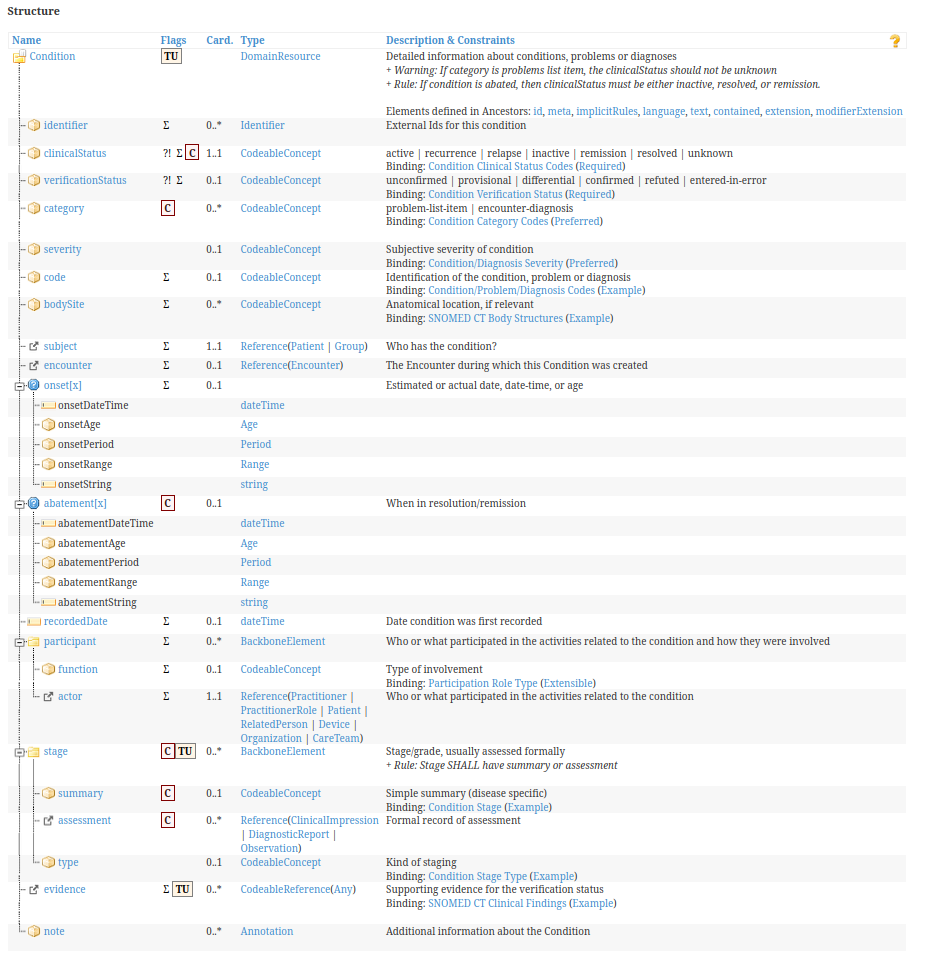
Let's try to dissect how to treat the different elements of this resource:
- Primitive data types are allowed and HAPI FHIR usually has a shortcut for elements that accept a primitive data element.
For those elements with single cardinality (0..1 or 1..1), like clinicalStatus, verificationStatus, or subject, in HAPI FHIR you will use setElementName(ElementValue), with ElementName= the "Nam"' in the first column and ElementValue instantiated based on the "Type" in the fourth column.
Example #J-13: "Single Cardinality" - SetCode
//Instantiating The Resource
   Condition co;
   co=new Condition();
   //We will fill our element with an element
   //of the Type defined by FHIR so we create one
   CodeableConcept cc;
   cc=new CodeableConcept();
   //And populate it
   cc.addCoding().setCode("44054006")
      .setSystem("http://snomed.info/sct");
   //We fill the resource element.
   //Since its only one, we just do set
co.setClinicalStatus(cc); - For those elements with multiple cardinality (1..* or 0..*), like identifier, bodySite, or category, in HAPI FHIR you will use addElementName(ElementValue) with ElementName= the "‘Name"' in the first column, and ElementValue instantiated based on the "Type" in the fourth column, or use the "fluent" approach, which we will describe.
Let's review a complex type as an example. This element: stage not only can repeat but also is not defined using a FHIR DataType, but as BackboneElement, a combination of FHIR elements: summary (CodeableConcept), assessment (reference to specific resource classes: ClinicalImpression, DiagnosticReport, or Observation), and type (CodeableConcept).
Here we have two options– let's call them "fluent" and "structured."
"fluent": We will populate the element without any intermediate object, concatenating the population of the different elements as we create them.
Example #J-14: Populating resources: "fluent" option
// Here we are using the "fluent" syntax,
// in a compact way, with co as a Condition resource
// Indenting is not needed, only added for more readability
 co.addStage()
  .setType(new CodeableConcept()
    .addCoding(new Coding()
      .setCode("422375001")
      .setSystem("http://snomed.info/sct")
      .setDisplay("Carcinoma of Colon, Clinical stage III")))
  .setSummary(new CodeableConcept()
    .addCoding(new Coding()
      .setCode("385356007")
      .setSystem("http://snomed.info/sct")
      .setDisplay("Tumor Stage Finding")))
  .addAssessment(new Reference()
     .setReference("DiagnosticReport/201993"))        ;
"structured": We will create an intermediate object of a class called "|ResourceName||ElementName|Component"
In our example, it will be called ConditionStageComponent.
And then we populate this object before setting (or adding) it as (one of the) resource element value(s).
Although this strategy seems more convoluted, the code generated by the fluent version may become complex and difficult to reuse or edit.
Note: We don't recommend eitherof the two strategies over the other. Each developer or group should adopt whichever is best for their skill level and coding standards.
In the next example we will see the same content defined for the condition stage, populated using the "structured" approach.
Example #J-15: Populating resources: "structured" option
//We declare and initialize the intermediate 'component' object
 Condition.ConditionStageComponent coStage;
   coStage=new Condition.ConditionStageComponent();
//We declare the objects
   CodeableConcept ccStageSummary=new CodeableConcept();
   CodeableConcept ccStageType=new CodeableConcept();
   Reference reAssessment=new Reference();
   //A diagnostic report
   //We populate the Summary
   ccStageSummary.addCoding()
   .setCode("422375001").setSystem("http://snomed.info/sct")
   .setDisplay("Carcinoma of Colon, Clinical stage III");
   //Populating the Type of Stage
   ccStageType.addCoding()
   .setCode("385356007").setSystem("http://snomed.info/sct")
   .setDisplay("Tumor Stage Finding");
   //For simplicity sake, we just set the reference
   //to a DiagnosticReport
   String sRef="DiagnosticReport/201992";
 reAssessment.setReference(sRef);
//Now we populate the stage
   coStage.setSummary(ccStageSummary);
   coStage.setType(ccStageType);
   coStage.addAssessment(reAssessment);   //Maybe more than one
   //And finally, we add the stage to the condition
   co.addStage(coStage);
- For elements that are "choices," the element needs to be created with one of the valid data type or element choices.
One example in the Condition resource is the "onset" element, defined as a choice between Age, DateTime, Period, Range and String.
Example #J-16: Populating resources: "Choices"
//You can only set one of these for a single instance.
Only two of them are demonstrated here
//OnSet: Age
co.setOnset(new Age().setValue(18).setCode("Y").setUnit("Y"));
//OnSet : Date Time
DateTimeType d=new DateTimeType();
co.setOnset(d.parseV3("20190213103000"));
Micro Assignment #J-16: Populate a resource – "fluent" option
Create a program to populate an AllergyIntolerance resource using the "fluent" strategy, with the following information:
ClinicalStatus: active
Type: allergy
Category: food
Criticality: high
Patient: Patient/49293
Code: 91935009 (http://hl7.org/fhir/ValueSet/substance-code): Allergy to peanuts
onset: age 10.
Introduction
HAPI FHIR provides you with these methods to extract values from a FHIR resource:
- To test whether an element is valued: Has|ElementName|().
This also applies to choice elements.
- To extract the value for a specific element: get|ElementName|()
- To get the first item of a repeating element: get|ElementName|FirstRep()
- To get a specific item of a repeating element: get|ElementName|.get(x) x=0...n
- To test whether an element or resource is empty: r.isEmpty()
- To get the narrative for a resource r.getText().getDiv().toString()
Examples for these methods
We will use a FHIR IPS-condition example to extract certain values:
Get the code and system for the ClinicalStatus
- To test whether an element is valued: HasClinicalStatus
- To extract the code for the first coding for the clinical status: getClinicalStatus().getCoding().get(0).getCode()
- To extract the system for the first coding for the clinical status: getClinicalStatus().getCoding().get(0).getSystem()
Example #J-17: Extracting Information from Instances: "Getters"
String catCode="";
String catSystem="";
if (co.hasClinicalStatus())
{
      catCode=co.getClinicalStatus().getCoding().get(0).getCode();
      catSystem=co.getClinicalStatus().getCoding().get(0).getSystem();
      System.out.println("Clinical Status");
      System.out.println("Code:");
      System.out.println(catCode);
      System.out.println("System:");
      System.out.println(catSystem);
   }
Example #J-18: Extracting Information from Instances: Using FirstRep
CodeableConcept cc;
if (co.hasVerificationStatus())
      {
         cc = co.getVerificationStatus();
         if (cc != null)
         {
            Coding cod = cc.getCodingFirstRep();
            catCode = cod.getCode();
            catSystem = cod.getSystem();
            System.out.println("Verification Status");
            System.out.println("Code:");
            System.out.println(catCode);
            System.out.println("System:");
            System.out.println(catSystem);
         }
}
Get the code and system for the VerificationStatus (using FirstRep)
Micro Assignment
Micro Assignment #J-17: Extract information from an IPS Observation
Create a program to extract the following information from an IPS Observation in OBSERVATION.XML: text – status – category – code – date/time - value
Introduction
HAPI FHIR provides methods to:
- Populate simple extensions
- Assemble complex extensions
- Add extensions to your resource
- Add extensions to any element in your resource
Populating a simple extension
To populate a simple extension, just create a new extension object:
Recipe #J-15: Populating a Simple Extension
Extension ext1=new Extension("|ExtensionURL|"
, new |ExtensionType| (|ExtensionTypeValue_1|,...,<ExtensionTypeValue_N|));
You need to replace:
| The URL defining the extension |
| Data type for the extension value |
| Value for each element in the data type |
Allowed extension data types should be described in the extension definition in the implementation guide, and limited to the data types described here: https://www.hl7.org/fhir/extensibility.html.
Example #J-19: Populate a simple IPS extension
We will populate the IPS-defined extension for Allergy Abatement DateTime.
Extension ext1
=new Extension("http://hl7.org/fhir/uv/ips/StructureDefinition/abatement-dateTime-uv-ips"
, new DateTimeType().setValue(Date.valueOf("2018-02-02"))
);
Populating complex extensions
To populate complex extensions, you need to first create the extension (only the URL), and then add all the simple extensions.
Recipe #J-16: Populate a Complex Extension
Extension complex_ext1=new Extension("|ComplexExtensionURL|")
Complex_ext1.AddExtension("|LocalExtensionURL_1|"
, new |ExtensionType_1| (|Extension_1_TypeValue_1|,...,<Extension_1_TypeValue_2|));
Complex_ext2.AddExtension("|LocalExtensionURL_2|"
, new |ExtensionType_2| (|Extension_2_TypeValue_1|,...,<Extension_2_TypeValue_2|));
You need to replace:
| The URL defining the complex extension |
| Local URL for the component of the complex extension |
| Data type for the extension component value |
| Value for each element in the data type for the extension component |
Example #J-20: Populate Complex Argonaut Extension
// Complex Extension - only the URL
Extension extc1=new Extension("http://hl7.org/fhir/us/core/StructureDefinition/us-core-ethnicity");
// First Component  - local url
extc1.addExtension("ombCategory",
new CodeableConcept().addCoding().setCode("2135-2")
.setSystem("urn:oid:2.16.840.1.113883.6.238").setDisplay("Hispanic or Latino"));
// Second Component – localurl
extc1.addExtension("detailed",
new CodeableConcept().addCoding().setCode("2184-0")
.setSystem("urn:oid:2.16.840.1.113883.6.238").setDisplay("Dominican"));
// Third Component  - local url
extc1.addExtension("text",
         new StringType("Hispanic or Latino"));
We will populate the Argonaut us-core-ethnicity extension for the Patient resource.
Adding extensions to a resource or element
To add your extensions to a resource, just invoke the AddExtension method.
Example #J-21: Adding an extension to an instance
Patient.AddExtension(extc1);To add your extensions to any element in your resource, you need to invoke the |ResourceName|.get|ElementName|()..addExtension method.
Example #J-22: Adding an extension to an element
Here we add the HL7 BirthTime extension to the BirthDate element of the Patient resource:
newPatient.setBirthDateElement(new DateType("1968-05-01"));
newPatient.getBirthDateElement().
addExtension(
         new Extension(
         "http://hl7.org/fhir/StructureDefinition/patient-birthTime" ,
         new DateTimeType().parseV3("19680501203040")
          )
            );
Micro Assignment
Micro Assignment #J-18: Create a Patient resource with extensions
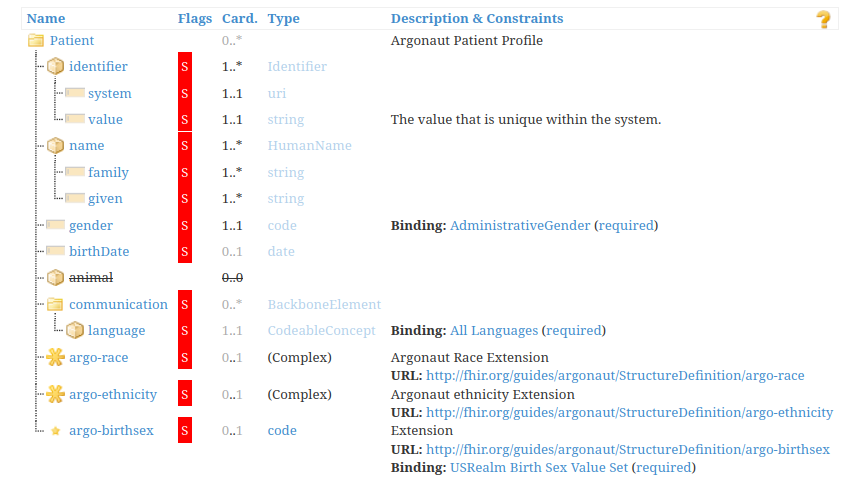
Create a patient resource with all the extensions required by the Argonaut IG.
Introduction
HAPI FHIR provides methods to:
- Test if a specific extension (or any extension) exists in a resource or element, including extensions (!)
- Get a specific extension (by index)
- Get the URL for an extension
- Determine the value type for an extension
- Get the value for an extension
Test if a specific extension exists
To test if a specific extension exists, use the hasExtension method:
Recipe #J-17: Test for Extensions in an Instance
if (|MyObject|.hasExtension(|ExtensionURL|)
{
     System.out.println("Extension Found!");
}
You need to replace:
| url defining the extension, if this parameter is not included, hasExtension returns true if the object has any extensions at all |
| Any resource or extension (for complex extensions) |
Get a Specific Extension by Index
To get a specific extension from an object, use the getExtension method.
Example #J-23: Get all extensions from a resource/element
for (int jExt = 0; jExt < re.getExtension().size(); jExt++)
  Extension iex = re.getExtension().get(jExt);
Get the URL and Value type for an extension
To get the URL and value type for an extension, use the getURL and the getValue.FhirType method.
Example #J-24: Get URL/Data Type for an extension
System.out.println("Extension URL");
System.out.println(iex.getUrl().toString());
System.out.println("Data Type");
System.out.println(iex.getValue().fhirType().toString());
Get the actual value from an extension
To get the actual value from an extension, it really depends on the extension value data type.
Example #J-25: Get the code from a Coding type extension
if (iex.getValue().fhirType().equals("Coding"))
   {  System.out.println(iex.getValue().getNamedProperty("code").getValues().toString());
   }
Micro Assignment
Micro Assignment #J-19: Extract all coded data from a patient resource extension
The file PATIENT_EXTENSIONS.XML has an Argonaut patient resource with all the extensions fully populated. Extract the codes for the "coding" extensions for the complex extension with URL http://hl7.org/fhir/us/core/StructureDefinition/us-core-race
We will consider only how to populate transaction and document bundles, which you will probably populate as a FHIR client.
Introduction
To populate transaction bundles as a client, you need to:
- First create the bundle and populate the header – at least: bundle type (transaction), bundle id (UUID)
- Add each entry, where each entry has:
- A fullUrl element, with an UUID identifying the resource inside the transaction
- A resource element, with the actual resource. Remember that references inside of the transaction point to the fullUrl for other entries
- A request element, including method (PUT or POST) and URL (search criteria for conditional create/update)
- Execute the transaction to the server and read the transaction response.
Micro Assignment #J-20: Create a bundle with blood pressure observations for a patient
Create a transaction bundle with a patient, a device and the blood pressure readings (systolic and diastolic).
Example #J-26: Create a Transaction Bundle, Populate header
Bundle bt =new Bundle();
bt.setType(Bundle.BundleType.TRANSACTION);
bt.setId(String.valueOf(UUID.randomUUID()));
Example #J-27: Add Entry to a Bundle
Device d=new Device();
String PatientEntryId=String.valueOf(UUID.randomUUID());
String DeviceEntryId=String.valueOf(UUID.randomUUID());
d.addIdentifier().setSystem("http://wwww.americandevices.com").setValue("123456");
d.addDeviceName().setName("BLOOD PRESSURE MASTER");
d.addVersion().setValue("1.23.78");
d.setManufacturer("AMERICAN BLOOD PRESSURE DEVICES");
d.setModelNumber("2000 PLUS");
d.setSerialNumber("123456");
//The patient for the device is the one in the first entry of the transaction
//See below the first addEntry/FullURL
d.setPatient(new Reference().setReference("Patient/"+PatientEntryId));
bt.addEntry().setFullUrl(DeviceEntryId)
  .setResource(d)
  .setRequest(
      new Bundle.BundleEntryRequestComponent()
          .setMethod(Bundle.HTTPVerb.PUT)
          .setUrl("Device?identifier=" +devToken)
             );
Example #J-28: Execute a Bundle Transaction
// Execute the transaction
Bundle outcomeResult = client.transaction()
        .withBundle(bt)
        .execute();
// Print the response
System.out.println(ctx.newXmlParser().setPrettyPrint(true).encodeResourceToString(outcomeResult));
To populate document bundles, you need to:
- First create the bundle and populate the header – at least: bundle type (document)
- Add a first special entry, containing a resource element: Composition.
- Add other entries, where each entry has:
- A fullUrl element, with a UUID identifying the resource inside the transaction.
- A resource element, with the actual resource. Remember that references inside of the transaction point to other entries' fullUrl.
- Post the document bundle to the server and read the server response.
Example #J-31: Create an IPS Document Bundle
Micro Assignment #J-22: Add an IPS-conformant immunization section and entry to our IPS bundle
Note: the physician administering the immunization is not the same author of the document, so you will need another practitioner resource, too.
You can process each resource in a document bundle using the function getEntry().
It returns a list of entries.
For each entry you can extract the actual resource using entry.getResource() and the fullUrl using entry.getFullUrl().
To extract a specific kind of resource you will need to cast it, as in (|SpecificResourceClass|) entry.getResource() )
Example #J-32: Process all entries in a bundle
for (Bundle.BundleEntryComponent entry: bu.getEntry())
{
//do something with entry using entry.getResource() // entry.getFullUrl()
}
Micro Assignment #J-23: Extract elements from ips document (ips_document.json)
Note: Extract Patient Name, Identifier and Condition code
In order to include resources as contained, the easiest way is to use this three-step method:
- Call setId with a unique string valid for XML reference. The string needs to be unique for the container resource.
- Call getContained().add to add the contained resource to the container resource.
- Call setReference() for the Reference element in the container resource where you need the reference to the contained resource.
Recipe #J-18: Include contained resources
|MyContainedResource|.setId("|ReferenceString|")
...
|MyContainerResource|.getContained.add(|MyContainedResource|)
|MyContainerResource|.|setElementName|(new Reference().setReference("|ReferenceString>"))
You need to replace:
| The instance of resource to be contained |
| The instance of resource containing the other(s) |
| The HAPI FHIR function to set the element referencing the contained resource |
| Unique string identifying the contained resource |
Example #J-29: Add a Contained Resource to an Observation
 //Container resource
Observation obs=new Observation();
//Contained resource
Device dev=new Device();
//Set Internal Id
dev.setId("#MyDevice");
dev.addDeviceName().setName("The Machine That Goes Bing");
//Add resource to the container
obs.getContained().add(dev);
//Set the internal reference to the internal id
obs.setDevice(new Reference().setReference("#MyDevice"));
Micro Assignment #J-21: Add a contained asserter element to an allergy-intolerance resource
In order to extract contained resources, you will need to use two methods:
- Call getContained() to obtain an array with all the contained resources.
- Call getContained().get[i] to get a specific resource from the array. I: 0...getContained().size
- You need to cast the resource to its specific class to access the resource elements.
Example #J-30:
Observation ob=parser.parseResource(Observation.class, content);

int ContainedCount=ob.getContained().size();

for (int i=0;i<ContainedCount;i++)
{
  if (ob.getContained().get(i).getResourceType().toString()=="Device")
  {
       Device dev=(Device) ob.getContained().get(i);
       System.out.println("NAME");
       System.out.println(dev.getDeviceNameFirstRep().getName().toString());
       System.out.println("TYPE");
       System.out.println(dev.getDeviceNameFirstRep().getType().toString());
}
Once you have your resource in string format, you will need to instantiate a parser.
The options are: newJsonParser() or newXmlParser()
To actually parse the string and create your resource, just call parser.parseResource()
Recipe #J-19: Parsing a Resource
IParser parser = ctx.new|ResourceFormat|Parser();
|ResourceClass| resource=parser.parseResource(|ResourceClass|.class,content);
You need to replace:
| JSON or XML |
| The kind of resource |
Example #J-33: Parsing a Document Bundle from a JSON file
//Dependencies
import ca.uhn.fhir.context.FhirContext;
import ca.uhn.fhir.parser.IParser;
import org.hl7.fhir.r4.model.*;
import java.io.File;
import java.io.IOException;
import java.nio.charset.Charset;
import java.nio.file.Files;
import java.nio.file.Paths;
import java.util.Scanner;
//Get the JSON file
   System.out.print("Enter the file name for the bundle in JSON : ");
   Scanner scanner = new Scanner(System. in);
   String inputString = scanner. nextLine();
   String content = readFile(inputString, Charset.defaultCharset());
 //Parse it
   FhirContext ctx = FhirContext.forR4();
   IParser parser = ctx.newJsonParser();
   Bundle bu=parser.parseResource(Bundle.class,content);
Micro Assignment #J-24: read an XML file and parse a patient resource; print name/identifier
Introduction
HAPI FHIR provides methods for both basic resource validation (against the core specification schemas) – which we have already explained – and profile based resource validation.
Let's explore the latter option:
Profile Declaration
You need to set the value for the meta.profile element of your resource to the canonical URL for the profile.
<meta>
  <profile
             value="http://myorganization.org/StructureDefinition/myprofilename"/>
</meta>
Profile Based Resource Validation (Server based)
If you have one server with all the required profiles (StructureDefinitions), ValueSets and CodeSystems (example: for a given implementation guide), you can call the server $validate operation with the profile declared in the meta element of the resource.
Example #J-34: Executing $validate for a resource
Parameters inParams = new Parameters();
     {
        inParams.addParameter().setName("resource").setResource(patient);
     }

     Parameters outParams = client
        .operation()
        .onType(Patient.class)
        .named("$validate")
        .withParameters(inParams)
        .execute();

     OperationOutcome oo = (OperationOutcome) outParams.getParameter().get(0).getResource();
     String results = ctx.newXmlParser().setPrettyPrint(true).encodeResourceToString(oo);
     System.out.println(results);
Micro Assignment #J-25: Use $validate to assess an instance conformance to us-core
Validate an instance of Patient using the $validate operation against a FHIR server.
FHIR server: https://hl7-ips-server.hl7.org/fhir/
Profile canonical URL: http://hl7.org/fhir/us/core/StructureDefinition/us-core-patient
Instance: Located in the PATIENT_EXTENSIONS.XML file
Introduction
HAPI FHIR implements parsing and serializing using the same class, called Parser.
To serialize an object into a string format, you need to specify which format when initializing an iParser object and then invoke the encodeResourceToString method.
Recipe # J-20: Serializing Resources
FhirContext ctx = FhirContext.forR4();
//...Populate |ResourceInstance| with elements
IParser p = ctx.new|ResourceFormat|Parser();
p.encodeResourceToString(|ResourceInstance|)
You need to replace:
| JSON or XML |
| The kind of resource |
Example #J-35: Serializing a Practitioner resource into JSON format
FhirContext ctx = FhirContext.forR4();
Practitioner newDoctor;
   {        newDoctor = new Practitioner();
      //active Record
      newDoctor.setActive(true);
      //Name (family, given)
      newDoctor.addName()
         .setFamily("Dellacroix")
         .addGiven("Madeleine");
      //Identifier
      newDoctor.addIdentifier()
         .setSystem("http://canada.gov/cpn")
         .setValue("51922");
      //Full Address
      newDoctor.addAddress()
         .addLine("3766 Papineau Avenue")
         .setCity("Montreal")
         .setState("Quebec")
         .setPostalCode("H2K 4J5")
         .setCountry("Canada");
      // Phone & e-Mail
      newDoctor.addTelecom()
         .setSystem(ContactPoint.ContactPointSystem.PHONE)
         .setValue("613-555-0192");
      // Specialty
      CodeableConcept q;
      Coding t;
      {
         t = new Coding();
         t.setCode("OB/GYN");
         t.setSystem("http://canada.gov/cpnq");
         q = new CodeableConcept();
         q.addCoding(t);
           newDoctor.addQualification()
            .setCode(q);
      }
        IParser p = ctx.newJsonParser();
      System.out.println(p.encodeResourceToString(newDoctor));
Introduction
The encodeResourceString method allows you to specify some useful options (this list is not exhaustive):
Option | Description |
DontEncodeElements | List of elements to mask – do not include |
PrettyPrint | Pretty Print XML / JSON true/false |
OmitResourceId | Omit the resource id true/false |
SummaryMode | Include only summary elements |
SuppressNarratives | Suppress all narratives |
Recipe #J-21: Options for Resource Serialization
Options are specified when invoking the encode method like this:
FhirContext ctx = FhirContext.forR4();
//...Populate |ResourceInstance| with elements...
IParser p = ctx.new|ResourceFormat|Parser();
System.out.println(p.set|Option1|(|Value1|).set|Option2|(|Value2|).encodeResourceToString(|ResourceInstance|))
You need to replace:
| JSON or XML |
| The kind of resource |
| Option from the list above |
| Value (true/false) or strings |
Micro Assignment #J-26: Use serializing options
Use the appropriate options to serialize the Practitioner example from the previous page, omitting the narrative, using only the summary elements and avoiding pretty print. If you do it right, there is one element that will not be serialized as part of the resource. Find out which one.
We need to explore several techniques related to searching in Java HAPI FHIR.
Searching: Search Parameters
You can express the search query by URL (generic query) or using the forResource() resource-specific search.
byUrl: Just include the URL search parameters using search().byUrl(|url|)
The |url| must be prefixed by the resource type, but the syntax for URL is the same you would use when writing the search manually. The HAPI FHIR object reference would not be helping you to write it (in your Java IDE) or validate it.
Example #J-36: Search using byUrl
//Search By Specialty using url
 String searchString = "PractitionerRole?specialty=http://nucc.org/provider-taxonomy|208D00000X";
 Bundle bu3 = client
    .search()
    .byUrl(searchString)
    .returnBundle(Bundle.class)
    .execute();
 //Print the Bundle result
 System.out.println(ctx.newJsonParser().setPrettyPrint(true).encodeResourceToString(bu3));
forResource: Here you can use all the search help methods devised by HAPI FHIR for each resource class. You need to specify .forResource(|ResourceType|.class) and a number of .and() clauses with the conditions you want to specify for your search.
We don't know of an overall reference on how to use it and what you can include, but to give you an idea, here is an example of the same search using criterion.
Example #J-37: Search using forResource()
Bundle bu4 = client
   .search()
   .forResource(PractitionerRole.class)
   .and(PractitionerRole.SPECIALTY.exactly()
   .systemAndCode("http://nucc.org/provider-taxonomy","208D00000X"))
   .returnBundle(Bundle.class)
   .execute();

System.out.println(ctx.newJsonParser().setPrettyPrint(true)
.encodeResourceToString(bu4));
Some handy options when expressing a forResource search – You can combine several .and methods together to narrow your search (like using & in the byUrl search):
Search By | Use Example | Options |
Identifier | .and(Organization.IDENTIFIER.exactly().systemAndCode("|system|","|value|")) | |
Name | .and(Organization.NAME.matches().value("|name|")) | You can also use contains() or matchesExaclty() |
Type (types, categories any resource classifier) | .and(Organization.TYPE.exactly().systemAndCode("system","code")) | |
Status | .and(Observation.STATUS.exactly().code("code")) | |
Dates | .and(Patient.BIRTHDATE.afterOrEquals().day("1968-03-25")) |
Searching: Processing the Search Result
The result will be returned in a Search results bundle.
We discussed in previous sections how to retrieve all the entries in a Document bundle.
To retrieve all the entries in a Search bundle, an extremely simple method is to just store all the returned resources in a list. You can then process the list using standard Java list processing methods.
Example #J-38: Processing search results
In this example we store all search results in an array, and then process the array:
Bundle resultsBundle = client
        .search()
        .forResource(Organization.class)
        .and(Organization.ADDRESS_STATE.matchesExactly().value("MI"))
        .and(Organization.ADDRESS_CITY.matchesExactly().value("Ann Arbor"))
        .returnBundle(Bundle.class)
        .execute();

     //resultsBundle will hold your result bundle
     List<IBaseResource> organizations = new ArrayList<>();

     //We store all resources in an array
     organizations.addAll(BundleUtil.toListOfResources(ctx, resultsBundle));

     //Now we process the array
     for (int iOrg=0;iOrg<organizations.size();iOrg++)
      {
        Organization org = (Organization) organizations.get(iOrg);
        String contents=             "Name:"+org.getName()+
              " Iden:"+org.getIdentifierFirstRep().getValue();
        System.out.println(iOrg);
        System.out.println(contents);
     }
Searching: Paging and Caching
To implement paging you need to:
- State how many resources you want in each page – use the count() method.
- If the current bundle has a link element pointing to the next page, use the loadPage().next() method to retrieve the next page.
- If the current bundle has a link element pointing to the previous page, use the loadPage().previous() method to retrieve the previous page
To implement caching of results, you need to use the cacheControl() method.
Example #J-39: Search with paging and caching
Example #J-40: Search Practitioners
Micro Assignment #J-27: Patient search by demographic data, identifier, and by_url
- Search for all patients with last (family) name exactly "Smith," gender=male, born after 05-May-1965.
- Search for the patient with identifier [system] http://hospital.gov/patients [value] 9999999 (Medical Record Number).
- Search for all patients with any name matching "John," gender=female, using the "by URL" search variant.
In order to encourage you to actually perform the micro assignments, the solutions are not included in each section but grouped here, so if you choose to read the solution instead of working it out, you can find all the solutions and examples here:
https://www.dropbox.com/sh/9dw9q7ofnbubf2t/AACUXvhQzDaCw9DIIZgCQzzma?dl=0
In this week will have formal "programming" assignments.We will ask you to change or enhance some programs using the Java client.
You can choose between two tracks: Argonaut and IPS.
In the Argonaut track, you will consume and create Argonaut-compatible resources, and search FHIR servers for patient demographics, provider information and terminology using
the HAPI FHIR.
In the IPS track you will consume IPS documents and show some of the underlying resources using the HAPI FHIR.
FHIR is just a specification. In order to do real work, we need to use our desired platform to program our access to FHIR servers.
The goal of this unit was to help you grasp common concepts that apply to all clients in FHIR and then apply them to the most used platforms/languages (Java, C#, JS).
Information about FHIR
There are a number of places where you can get information about FHIR.
- The specification itself is available online at www.hl7.org/FHIR. It is fully hyperlinked and very easy to follow. It is highly recommended that you have access to the specification as you are reading this module, as there are many references to it – particularly for some of the details of the more complex aspects of FHIR.
- All the subjects detailed in this unit are deeply documented in the FHIR specification and implementation guides. If you can't explain something, this should be the first source-of-truth.
- The root HL7 wiki page for FHIR can be found at http://wiki.hl7.org/index.php?title=FHIR. The information here is more for those developing resources, but still very interesting. Some wiki information is more historical and may not reflect the most recent version of the specification.
- The team uses the FHIR chat (http://chat.fhir.org) as a place to answer implementation-related questions –and therefore have both question and answer available for reference.
Page