
In this unit we will focus on how to create a FHIR server.
The objective is that by the end of this unit you will have an idea of what is involved in creating a FHIR server and strategies to include one in your architecture.
Although many people have been working with FHIR for a long time, we know from experience that many times not everyone is aware of what functionalities a FHIR server should or can have and what your obligations are as the creator of a server, so we will review them.
We will present the general concepts for server libraries (how to perform common tasks for FHIR servers: metadata, CRUD methods, etc.) and then describe how each library allows you to do each task.
So, this unit in fact contains 3 different subunits on how to use each library (Java, C#,JavaScript).
This unit DOES NOT CONTAIN MicroAssignments: we want you to focus on solving the assignments.
What you'll learn
After Unit 3, you will be able to:
- Describe the general structure of a FHIR Server: Capability Statement, Operations, Resource Model.
- Understand how a FHIR server can fit in your project's architecture.
- Implement a minimal FHIR facade using your chosen platform (Java / node.js / C#)
This specific subunit talks about the FHIR-HAPI for Java
Note:
FHIR HAPI is maybe the most used tool for implementing FHIR servers, both FHIR facades and general purpose FHIR servers.
It's open-source with optional paid support.
Full, extensive documentation for FHIR HAPI (Server) is available here: https://hapifhir.io/hapi-fhir/docs/server_plain/server_types.html
To work with FHIR R4, you will need OpenJDK-19 and HAPI FHIR 5.7.0 or higher (we used these versions to validate and run our code).
Throughout these sections, you will see three distinct icons:


Sometimes to illustrate a method we use both examples and recipes, and sometimes only examples, depending on the complexity of the subject.
HAPI FHIR provides several mechanisms for building FHIR servers
The right choice depends on the specifics of what you are trying to achieve
We already have some architectures, but the focus in this case will be creating a FHIR facade.
These types of servers are actually an implementation of a FHIR server against an arbitrary server that you already have
This way, you write code that handles resource storage and recovery logic, and HAPI FHIR takes care of:
● HTTP processing
● Analysis / serialization
● FHIR REST semantics
Many organizations already use this module to successfully create FHIR servers in a variety of use cases, which include:
● Hospitals: Adding a FHIR data access layer to existing data and clinical data repositories
● Providers: Integration into existing products to add FHIR capabilities
● Researchers: Data collection and reporting platforms
HAPI FHIR provides a simple way to incorporate the capabilities of a RESTful FHIR server into your applications
The RESTful server is based on Servlet, so it should be easy to implement in any of the many compatible containers that exist.
The configuration is mainly done by simple annotations, which means that it should be possible to create a FHIR server quickly and easily.
The project has great online documentation, so in this document we will focus on the basics and the example project for the course, which is detailed in the video
If we focus on the server module, documentation is available here:
https://hapifhir.io/hapi-fhir/docs/server_plain/server_types.html
To cover the main functionalities of a server, we will focus on seeing how we incorporate the different resources that we want our server to handle and what operations on them we admit
We will look at the handling of exceptions, the handling of paging, interceptors, the validation of resources and finally exposing the capabilities of our server. Let's begin!
A good place to start to begin a FHIR HAPI facade server from scratch is
https://github.com/FirelyTeam/fhirstarters/tree/master/java/hapi-fhirstarters-rest-server-skeleton/
In fact, the project you will modify as part of our assignment is based on this HAPI project.
Steps to Create a FHIR HAPI Restful Facade
1- Create the Resource Providers
2- Create the Server
3- Manage Errors
4- Implement Security (not in this course's scope)
The first step in creating a plain server for a FHIR HAPI RESTful facade is to define one or more resource providers.
There are two types of providers that can be registered on a HAPI FHIR server:
● Resource Providers are POJO classes that implement operations for a specific type of resource.
● Plain Providers are POJO classes that implement operations for multiple types of resources, or for operations at the system level.
A resource provider is a class that can handle a type of FHIR resource so that it can be made available by its server.
For example, if you want to allow your server to work with Patient, Observation and Location resources, you will need to incorporate all three resource providers.
Each class must implement the interface IResourceProvider and will contain one or more methods that have been specially annotated to indicate which RESTful operation that resource supports.
For reference, you will find an example in the PatientResourceProvider.java class in the example project for our course
You will most likely need to add more methods (create, update, conditional create, transactions, etc.).
In addition to resource providers, which are specific to the type of resource, there is a second type of provider known as plain providers
These providers can be used to define both resource operations that apply to multiple types of resources and operations at the server level.
Defining a provider by resource is a good strategy to keep the code readable and maintainable, but it is also possible to place methods for multiple types of resources in a specific class
Providers that do not implement IResourceProvider (and, therefore, are not linked to a specific type of resource) are known as simple providers.
A simple provider can implement any REST operation, but will generally need to explicitly indicate what type of resource it applies to.
If the method directly returns a resource or a collection of resources (as in a read/search operation or instance type), the type of resource will be deduced automatically If the method returns a Bundle resource, it is necessary to explicitly specify the type of resource in the method annotation.
For our server, we will focus on Resource Providers.
Below we will show simple examples available in the course's example project for reference.
First, remember to import the necessary libraries
Example #J-1: Including required libraries for resource providers
import ca.uhn.fhir.rest.annotation.Create;
import ca.uhn.fhir.rest.annotation.IdParam;
import ca.uhn.fhir.rest.annotation.OptionalParam;
import ca.uhn.fhir.rest.annotation.Read;
import ca.uhn.fhir.rest.annotation.ResourceParam;
import ca.uhn.fhir.rest.annotation.Search;
import ca.uhn.fhir.rest.api.MethodOutcome;
import ca.uhn.fhir.rest.api.server.IBundleProvider;
import ca.uhn.fhir.rest.param.DateParam;
import ca.uhn.fhir.rest.param.StringParam;
import ca.uhn.fhir.rest.param.TokenParam;
import ca.uhn.fhir.rest.server.IResourceProvider;
import ca.uhn.fhir.rest.server.exceptions.InvalidRequestException;
import ca.uhn.fhir.rest.server.exceptions.ResourceNotFoundException;
import org.hl7.fhir.r4.model.IdType;
import org.hl7.fhir.r4.model.Patient;
To add the corresponding resource provider to Patient, we create the class PatientResourceProvider.java in which we will specify which operations we will allow on the resource.
We will detail 3 basic services: create, read and search, and you will have to create another one.
The Create operation saves a new resource on the server.
The creation methods, as we see in the sample code, must be declared with the annotation @Create, and must have a single parameter @ResourceParam.
This parameter contains the resource instance that will be created
Like the update, it must return an object of type MethodOutcome and will contain the identity of the created resource.
The following snippet shows how to define a resource creation method
Example #J-2: Defining a Server ‘Create Resource' method
@Create
public MethodOutcome create( @ResourceParam Patient patient ) {
  MethodOutcome outcome = new MethodOutcome();
   outcome.setId( new IdType( RESOURCE_TYPE,  legacyService.create( patient ).longValue() ) );
   return outcome;
}
The read operation retrieves a resource by ID.It is set with the annotation @Read, and has at least one unique parameter with the annotation @IdParam.
Example #J-3: Defining a Server ‘Direct Read' method
@Read()
public Patient findById( @IdParam IdType id ) {
Integer patientId = FhirResourceUtils.getInteger( id );
Patient patient = legacyService.findById( patientId );
if( patient == null )
throw new ResourceNotFoundException( String.format( "Patient with identifier %s not found", typeManager.formatIdValue( PatientIdentifierTypeEnum.PATIENT_ID, patientId ) ) );
return patient;
8      }
The search operation returns a Bundle with zero or many resources, which matches a given set of parameters.
A search is a very powerful and potentially very complicated operation to implement, with many possible parameters and combinations
All documentation on search implementation using HAPI FHIR is available here:
https://hapifhir.io/hapi-fhir/docs/server_plain/rest_operations_search.html
In general, we can differentiate two types of searches – the first without parameters and the second with parameters.
The following example shows a search without parameters
This operation should return all resources of a given type (this obviously does not make sense in all contexts, but it could for some types of resources).
Example #J-4: Search Without Parameters
@Search
public List<Patient> getAllPatients() {
  List<Patient> retVal=new ArrayList<Patient>(); // populate this
  return retVal;
}
1
To allow searches using parameters, add one or more parameters to your search method and label these parameters as @RequiredParam or @OptionalParam.
This annotation takes a "name" parameter and specifies the name of the parameter (as it will appear in the search URL)FHIR defines standardized parameter names for each resource, and these are available as constants in the HAPI resource classes.
Parameters that take a text string as a format must use the type StringParam
Example #J-5: String Search
@OptionalParam( name = Patient.SP_NAME )
StringParam name, @OptionalParam( name = Patient.SP_FAMILY ) StringParam family
In this case, SP_NAME and SP_FAMILY are the constants defined by HAPI FHIR.
The type "token" is used for parameters that have two parts.
It can be an identifier (which has a system URI and the actual identifier) or a code (which has a coding system and the code itself).
Example #J-6: Token Search (Identifier)
@Search()
public List<Patient> searchByIdentifier(@RequiredParam(name=Patient.SP_IDENTIFIER) TokenParam doc) {
   String identifierSystem = doc.getSystem();
   String identifier = doc.getValue();

   List<Patient> retVal = new ArrayList<Patient>();
   // ...populate...
   return retVal;
}
The FHIR specification provides a syntax for specifying dates and times (but for simplicity we will only refer to dates here) as search criteria.
Dates can be optionally pre-set with a qualifier
For example, the string = ge2019-01-02 means any date on or after 2019-01-02.
To accept a date type parameter, use the DateParam search parameter type
To accept a date range parameter, use the DateRangeParam search parameter type
Example #J-7: Date Search (Simple)
@Search()
public List<Patient> searchByPatientBirthDate( @RequiredParam(name=Patient.SP_BIRTHDATE) DateParam birthDate ) {
   ParamPrefixEnum prefix = birthDate.getPrefix();
   Date date = birthDate.getValue();
   TemporalPrecisionEnum precision = birthDate.getPrecision();

   List<Patient> retVal = new ArrayList<Patient>();
   // ...populate...
   return retVal;
}
Recipe #J -1: How to implement a CRUD operation in our FHIR HAPI server
In order to implement one of the CRUD operations for our facade server, you need to ‘cover all the bases':
- complete the resource provider (<<ResourceClassName>>ResourceProvider)
The objective, as with the other operations that have already been carried out on the resource, is to delegate the resolution of the method to the legacy package.
In our case, for example, in order to implement searches:
PatientResourceProvider.searchPatient will call legacyPerson.search()
- Use the HAPI <<Method>> annotation for each method you are implementing in the ResourceProvider
- In our case, we implemented @Search and @Read(), because we implemented a read-only facade.
Once the resource providers are established, the next step is to define the class at the server level.
HAPI provides a class called RestfulServer, which is a specialized Java servletTo create a server, simply create a class that extends RestfulServerFor reference, take SimpleRestfulServlet.java from the sample project.
Example #J-8: Imports Needed to implement a FHIR HAPI Server
import javax.servlet.ServletException;
import javax.servlet.annotation.WebServlet;
import ca.uhn.fhir.context.FhirContext;
import ca.uhn.fhir.rest.server.RestfulServer;
Example #J-9: Implementing a simple FHIR HAPI RestfulServer
In bold is what we added to enable support for MedicationRequest and Patient resources, and to intercept output to use pretty print for HTML browsers.
import javax.servlet.ServletException;
import javax.servlet.annotation.WebServlet;
import ca.uhn.fhir.context.FhirContext;
import ca.uhn.fhir.rest.server.RestfulServer;
import ca.uhn.fhir.rest.server.interceptor.ResponseHighlighterInterceptor;
import org.hl7.fhir.fic.mapper.MedicationRequestResourceProvider;
import org.hl7.fhir.fic.mapper.PatientResourceProvider;

@WebServlet("/*")
public class SimpleRestfulServer extends RestfulServer {

        @Override
        protected void initialize() throws ServletException {
                // Create a context for the appropriate version
                setFhirContext(FhirContext.forR4());
                // Register resource providers
                registerProvider(new PatientResourceProvider());
                registerProvider(new MedicationRequestResourceProvider());
                // Format the responses in HTML
                registerInterceptor(new ResponseHighlighterInterceptor());
        }
}
Within RESTful operations, it will generally return resources or bundles, but it will also have to return the errors to the client for various reasons.
By default, HAPI generates error responses for several already established conditionsFor example, if the user makes a request for a resource type that does not exist or attempts to perform a search with an invalid parameter, HAPI will automatically generate HTTP 400 Invalid Request and return an OperationOutcome resource in response to the error details.
Similarly, if the implementation of your method throws an exception, the server generally will automatically generate an HTTP 500 Internal Error with an OperationOutcome with details about the exceptionThis is modifiable, however, as we will see later.
In many cases, you will want to respond to customer requests with a specific HTTP error code (and possibly your own error message too)Sometimes this is a requirement of the FHIR specification or an implementation guide (For example, the "validate" operation requires an HTTP 422 Unprocessable Entity response if the validation fails.)
Other times this is simply a requirement of your particular business (for example, if you want to provide specific HTTP status codes for certain types of errors), and other times it may be a requirement of the FHIR or HTTP specifications to respond in a specific way to certain conditions.
To customize the error that HAPI server methods return, you must throw an exception that extends the HAPI BaseServerResponseException classSeveral exceptions that extend this class will generate a different HTTP status code.
For example, ResourceNotFoundException causes HAPI to return HTTP 404 Resource Not Found
A complete list of available exceptions is included in the exceptions package summary.
If you want to return an HTTP code for which there is no predefined exception, you can throw the exception UnclassifiedServerFailureException, which allows you to return any status code you want.
By default, HAPI will automatically generate an OperationOutcome resource that contains details about the exception that occurred. We will go through some examples from our project.
Example #J-10: Handling a null resource
if( patient == null )
  throw new ResourceNotFoundException( String.format( "Patient with identifier %s not found", typeManager.formatIdValue( PatientIdentifierTypeEnum.PATIENT_ID, patientId )));
Example #J-11: Handling an invalid date
if( calendar != null ) {
            SimpleDateFormat sdf = getCalendarFormat();
            try {
                str = sdf.format( calendar.getTime() );
            } catch( IllegalArgumentException e ) {
                throw new IllegalArgumentException( String.format( "Invalid format date [%s]", sdf.toPattern() ), e );
            }
        }
We can also convert an IllegalArgumentException into an InvalidRequestException to send a HAPI-controlled message.
Example #J-12: Converting Exceptions to HAPI-controlled messages
try {
 //...do something
}

return patientService.findByCriteria(FhirResourceUtils.getString(name), FhirResourceUtils.getString(family), docSystem, docValue,
 birthdateCal, FhirResourceUtils.getString(gender));
}
catch (IllegalArgumentException e) {
 throw new InvalidRequestException(e.getMessage());
}
You may need to create a custom OperationOutcome
If so, you can pass one into the constructor of the exception you are throwing.
The Search and History operations return a bundle that contains zero or more resources
RESTful FHIR servers can optionally support paged responses, which means that (for example) if a search returns 500 resources, the server can return a packet containing only the first 20 and a link that will return the next 20, etc.
By default, servers will return all resources immediately in a single bundleHowever, you can take advantage of the built-in paging functionality to automatically add pagination links and manage these links to access more data.
There are two complementary parts for HAPI FHIR server paging support: paging providers and package providers.
To support paging, your server must implement IPagingProvider, which provides two key methods:
● String storeResultList (RequestDetails, IBundleProvider), which takes a package provider (see below) and stores it for later recovery.
This could be simply by keeping it in memory, but it could also be stored on disk, in a database, etc.
This method should return a textual identification that can be used to retrieve the list later.
● retrieveResultList (RequestDetails, String), which takes an ID obtained from a previous call to storeResultList and returns the corresponding result list.
You can find the detail of paging management here: https://hapifhir.io/hapi-fhir/docs/server_plain/paging.html
If a server supports a paging provider, an additional optimization is also the use of a bundle provider
What this does is take the list returned by the server List <IBaseResource> and instead of returning the list, it will return IBundleProvider.
The application's bundle provider contains our project's entire result list
This simplification was done for instructional purposes and is not recommended for an application in production, because the entire list is in memory (see line 8 of the ListBundleProvider class)
In a production environment, the getResources method should call the service that performs the query of the page requesting the HAPI framework.
Example #J-13: Bundle Provider
import ca.uhn.fhir.rest.api.server.IBundleProvider;

// more imports


public class ListBundleProvider < B extends IBaseResource, E extends Serializable > implements IBundleProvider {

 private final List < E > list;
 private final FhirResourceConverter < E, B > converter;
 private final InstantType searchTime = InstantType.withCurrentTime();
 private Integer preferredPageSize = null;


 public ListBundleProvider(List < E > list, FhirResourceConverter < E, B > converter) {
  Validate.notNull(list);
  Validate.notNull(converter);
  this.list = list;
  this.converter = converter;
 }

 @Override
 public List < IBaseResource > getResources(int fromIndex, int toIndex) {
  int end = Math.min(toIndex, list.size());
  List < E > subList = list.subList(fromIndex, end);
  return CollectionUtils.isEmpty(subList) ? null : (List < IBaseResource > ) converter.convertToResource(subList);
 }

 public void setPreferredPageSize(int preferredPageSize) {
  this.preferredPageSize = preferredPageSize;
 }

 @Override
 public Integer preferredPageSize() {
  return preferredPageSize;
 }

 @Override
 public Integer size() {
  return list.size();
 }

 @Override
 public IPrimitiveType < Date > getPublished() {
  return searchTime;
 }

 @Override
 public String getUuid() {
  return null;
 }

}
By default, the paging system uses parameters that are included in the page links for the index and the page size.
Another option is to use "named pages," which means that the server simply assigns an ID to each page, and the next/previous page is requested using this ID.
To support named pages, the IPagingProvider must implement the method retrieveResultList (RequestDetails theRequestDetails, String theSearchId, String thePageId).
Then the search/history methods can return a BundleProviderWithNamedPages or simply implement the method getPageId () in its own implementation IBundleProvider.
HAPI FHIR introduced a new interceptor framework in version 3.8.0 that is used throughout the library
In previous versions of HAPI FHIR, there was one framework for the server and another for the clientThese have now been combined into a single unified (and much more powerful) framework.
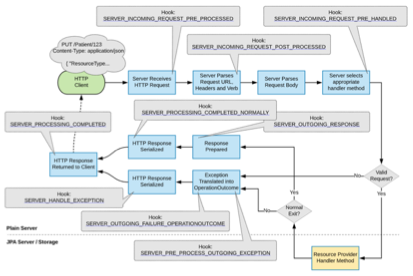
Interceptors can be "triggered" at various points in the processing chain on both the client and the serverThe interceptor framework has been designed to be flexible enough to hook into almost every part of the libraryWhen someone asks "How do I get HAPI FHIR to do X?" the answer is very often to create an interceptor.
Example #J-14: A very simple interceptor
@Interceptor
public class SimpleServerLoggingInterceptor {

 private final Logger ourLog = LoggerFactory.getLogger(SimpleServerLoggingInterceptor.class);

 @Hook(Pointcut.SERVER_INCOMING_REQUEST_PRE_HANDLED)
 public void logRequests(RequestDetails theRequest) {
  ourLog.info("Request of type {} with request ID: {}", theRequest.getOperation(), theRequest.getRequestId());
 }

}
● Interceptor: a class like the example above that has one or more Hook methods on itThere is an optional annotation called @Interceptor and it can be used, but it is not necessary.
● Hook: an interceptor method that is invoked in response to a specific actionHooks must carry the annotation @Hook.
● Pointcut: a specific point in the HAPI FHIR processing pipeline that is being interceptedEach hook must declare which pointcut it is interceptingHAPI FHIR defines all available pointcuts in the Pointcut enumeration.
● Hook parameters: each pointcut defines a list of parameters that can be passed to a Hook for a given pointcutFor example, the definition of the pointcut SERVER_INCOMING_REQUEST_PRE_HANDLED used in the previous example defines 4 types of parameters and in the example only uses one.
HAPI FHIR does include some built-in interceptors, let's take a brief look into some of them:
- Logging interceptors
- Response Highlighter Interceptors
- Exception Handling Interceptors
- Request Validation Interceptors
- Response Validating Interceptors
- Security Interceptors
LoggingInterceptor can be used to generate a log for each incoming request and provides a flexible message format that can be used to establish a customized level of detail about each incoming request.
Example #J-15: A logging interceptor
@WebServlet(urlPatterns = {
 "/fhir/*"
}, displayName = "FHIR Server")
public class RestfulServerWithLogging extends RestfulServer {
 @Override
 protected void initialize() throws ServletException {
  // ..define your resource providers here ..
  // Now register the logging interceptor
  LoggingInterceptor loggingInterceptor = new LoggingInterceptor();
  registerInterceptor(loggingInterceptor);
  // The SLF4j logger "test.accesslog" will receive the logging events
  loggingInterceptor.setLoggerName("test.accesslog");
  // This is the format for each lineA number of substitution variables may
  // be used here See the JavaDoc for LoggingInterceptor for information on
  // what is available
  loggingInterceptor.setMessageFormat("Source[${remoteAddr}] Operation[${operationType} ${idOrResourceName}] UA[${requestHeader.user-agent}] Params[${requestParameters}]");
 }
}
ResponseHighlighterInterceptor detects when a request comes from a browser and returns HTML with highlighted XML/JSON syntax instead of just plain textIn other words, if a user uses a browser to request http://foo/Patient/1 by typing that address in their URL bar, they will get a nice formatted HTML with a readable version of the contentThis is particularly useful for those who test public APIs where users can invoke the API directly to see how it works.
For an example of what this interceptor's output looks like, check our server.
Without this interceptor, the answer would be plain JSON/XML.
Example #J-16: A response highlighter interceptor
@WebServlet(urlPatterns = { "/fhir/*" }, displayName = "FHIR Server")
public class RestfulServerWithResponseHighlighter extends RestfulServer {

   @Override
   protected void initialize() throws ServletException {

      // ..define your resource providers here ..

      // Now register the interceptor
      ResponseHighlighterInterceptor interceptor = new ResponseHighlighterInterceptor();
      registerInterceptor(interceptor);

   }

}
ExceptionHandlingInterceptor can be used to customize what is returned to the client and what is logged when the server issues an exception for any reason (including usual things like UnprocessableEntityExceptions or unexpected exceptions thrown by the client).
Example #J-17: An exception handling interceptor
@WebServlet(urlPatterns = {
 "/fhir/*"
}, displayName = "FHIR Server")
public class RestfulServerWithExceptionHandling extends RestfulServer {

 @Override
 protected void initialize() throws ServletException {

  // ..define your resource providers here ..

  // Now register the interceptor
  ExceptionHandlingInterceptor interceptor = new ExceptionHandlingInterceptor();
  registerInterceptor(interceptor);

  // Return the stack trace to the client for the following exception types
  interceptor.setReturnStackTracesForExceptionTypes(InternalErrorException.class, NullPointerException.class);

 }

}
HAPI FHIR provides a pair of interceptors (RequestValidatingInterceptor and ResponseValidatingInterceptor) that can be used to validate incoming requests received by the server, as well as outgoing responses generated by the server.
These interceptors can be configured to add headers to the response, to return some type of error (HTTP 422 and generate an exception in the process) or to add to the OperationOutcome returned by the server.
We will see later how we combine it with the Validator profile.
This is the interceptor that we use in our course example project and it shows how to register this interceptor within a HAPI FHIR serverYou can see the source code in FhirRestfulServlet.java
Example #J-18: A validation interceptor
// Register a validator interceptor
        RequestValidatingInterceptor requestInterceptor = new RequestValidatingInterceptor();
        requestInterceptor.addValidatorModule( instanceValidator );
        requestInterceptor.setFailOnSeverity( ResultSeverityEnum.WARNING );
        requestInterceptor.setAddResponseHeaderOnSeverity( ResultSeverityEnum.INFORMATION );
        requestInterceptor.setResponseHeaderValue( "Validation on ${line}: ${message} ${severity}" );
        requestInterceptor.setResponseHeaderValueNoIssues( "No issues detected" );
        registerInterceptor( requestInterceptor );
There are other security-related interceptors defined by HAPI that we will not go into detail about, but you can check them out here
● CorsInterceptor Can be used to implement CORS support on your server
● AuthorizationInterceptor A powerful interceptor to implement authorization rules at the user and system levels
● ConsentInterceptor Implements rules and consent policies
● SearchNarrowingInterceptor Is designed to be used in conjunction with AuthorizationInterceptorIt uses a similar strategy in which a dynamic list is created for each request, but the purpose of this interceptor is to modify the searches of clients that are received (after HAPI FHIR received the HTTP request, but before the search is actually performed) to restrict the search or to search only for specific resources or resources to which the user has access.
● BanUnsupportedHttpMethodsInterceptor Used when a security audit rule requires the server to return an HTTP 405 if an unsupported HTTP verb is received (for example, TRACE).
● CaptureResourceSourceFromHeaderInterceptor Triggered by the preprocessing of a requestIf you want to override the value of Resource.meta.source using the value supplied in an HTTP header, you can use CaptureResourceSourceFromHeaderInterceptor to do it.
If the interceptor you need doesn't exist, you can create your own.
Creating your own interceptors is easy
Custom interceptor classes do not need to extend any other classes or implement any particular interface.
● They must have at least one method annotated with the annotation @Hook.
● The method must have an appropriate return value for the chosen pointcut.
● The method can have any of the parameters specified for the chosen pointcut.
Example #J-19: Creating a custom interceptor
 @Interceptor
  public class RequestCounterInterceptor {

   private int myRequestCount;

   public int getRequestCount() {
    return myRequestCount;
   }

   /**
    * Override the incomingRequestPreProcessed method, which is called
    * for each incoming request before any processing is done
    */
   @Hook(Pointcut.SERVER_INCOMING_REQUEST_PRE_PROCESSED)
   public boolean incomingRequestPreProcessed(HttpServletRequest theRequest, HttpServletResponse theResponse) {
    myRequestCount++;
    return true;
   }

  }
The following example shows an exception handling interceptor that overrides default exception handling and provides a custom response.
Example #J-20: Custom Exception Handling Interceptor
public class RequestExceptionInterceptor {

   @Hook(Pointcut.SERVER_HANDLE_EXCEPTION)
   public boolean handleException(
      RequestDetails theRequestDetails,
      BaseServerResponseException theException,
      HttpServletRequest theServletRequest,
      HttpServletResponse theServletResponse) throws IOException {

      // HAPI's server exceptions know what the appropriate HTTP status code is
      theServletResponse.setStatus(theException.getStatusCode());

      // Provide our custom response
      theServletResponse.setContentType("text/plain");
      theServletResponse.getWriter().append("Failed to process!");
      theServletResponse.getWriter().close();

      // Since we handled this response in the interceptor, we must return false
      // to stop processing immediately
      return false;
   }

}
The following diagram shows the pipeline and where it could be intercepted
A very important role of every server is to be able to validate everything it receives before processing itThere are several validation strategies.
Undoubtedly, the most used involves the parsing of the information receivedFor example, it can be used to generate exceptions or display error messages if a resource that is received does not contain the expected elements or does not meet the standard.
Another one that is widely used is validation against a profile (whether from an implementation guide or FHIR's profiles)Both options make reference to a StructureDefinition and/or ValueSet resource.
Finally, validation by schema or schematron uses XSD/SCH files published by FHIRThis validator works well but produces less useful error messages than profile-based validation.
Let's take a look at the three cases.
This validation is enabled by calling IParser#setParserErrorHandler (IParserErrorHandler) in the FhirContext or in individual instancesThis method takes an IParserErrorHandler, which is a callback that will be invoked every time an analysis problem is detected.
There are two implementations of IParserErrorHandler that are integrated in HAPI FHIR, and you can also set your own implementation if you wish.
● LenientErrorHandler records any errors but does not interrupt the analysisThis controller is used by default and records errors at the "warning" level.
● StrictErrorHandler throws a DataFormatException if an error is detected.
The following example shows how to configure an analyzer to use strict validation.
Example #J-21: Configuring for Strict Validation
FhirContext ctx = FhirContext.forR4();

// Create a parser and configure it to use the strict error handler
IParser parser = ctx.newXmlParser();
parser.setParserErrorHandler(new StrictErrorHandler());

// This example resource is invalid, as Patient.active can not repeat
String input = "<Patient><active value=\"true\"/><active value=\"false\"/></Patient>";

// The following will throw a DataFormatException because of the StrictErrorHandler
parser.parseResource(Patient.class, input);
You can also configure the error handler at the FhirContext level, which is useful for clients.
Example #J-22: Configuring the Error Handler at the FhirContext level
FhirContext ctx = FhirContext.forR4();

ctx.setParserErrorHandler(new StrictErrorHandler());

// This client will have strict parser validation enabled
IGenericClient client = ctx.newRestfulGenericClient("https://hl7-ips-server.hl7.org/fhir");
FhirContext level validators can also be useful on servers.
Example #J-23: Configuring the Error Handler for a server
  public class MyRestfulServer extends RestfulServer {

   @Override
   protected void initialize() throws ServletException {
     // ...Configure resource providers, etc..

     // Create a context, set the error handler and instruct
     // the server to use it
     FhirContext ctx = FhirContext.forR4();
     ctx.setParserErrorHandler(new StrictErrorHandler());
     setFhirContext(ctx);
    }

    .
  }
This is one of the most used validation methods on servers in production since its process is based on a profile or implementation guide and thus maximizes the potential of FHIR resources.
HAPI provides an integrated and configurable mechanism to validate resources
This mechanism is called Resource Validator.
The resource validator is an extensible and modular system, and you can configure it in several ways to obtain the specific type of validation you want to achieveIt can be invoked manually at any time by creating a validator and configuring it with one or more instances of IValidatorModule.
This validator is very powerful because it uses terminology services to validate codes, StructureDefinitions to validate semantics and a custom XML/JSON parser to provide error messages.
To run the validator, simply create an instance of FhirInstanceValidator and register it in a new validator, as shown in the following examples.
Example #J-24: Setting a Validator
// Set validator
FhirContext fhirContext = getFhirContext();
FhirValidator validator = fhirContext.newValidator();
FhirInstanceValidator instanceValidator = getInstanceValidator(fhirContext);
validator.registerValidatorModule(instanceValidator);
fhirContext.setParserErrorHandler(new StrictErrorHandler());
Example #J-25: Invoking a Validator
private FhirInstanceValidator getInstanceValidator(FhirContext context) {
 FhirInstanceValidator validator = null;

 try {
  // Get the input stream of each profile
  List < InputStream > files = new ArrayList < > ();
  for (String profile: PROFILES)
   files.add(resourceLoader.getResource(PROFILES_DIRECTORY + profile).getInputStream());

  if (CollectionUtils.isEmpty(files)) {
   // Create a default instance validator
   validator = new FhirInstanceValidator();
  } else {
   // Create an instance validator using the profiles
   PrePopulatedValidationSupport valSupport = new PrePopulatedValidationSupport();
   DefaultProfileValidationSupport defaultSupport = new DefaultProfileValidationSupport();
   ValidationSupportChain support = new ValidationSupportChain(valSupport, defaultSupport);
   loadStructureDefinitions(context, valSupport, defaultSupport, files);

   validator = new FhirInstanceValidator(support);
   validator.setAnyExtensionsAllowed(true);
  }

  return validator;
 } catch (IOException e) {
  throw new IllegalStateException(String.format("Can't find profiles [%s]", PROFILES_DIRECTORY), e);
 }
}
FhirInstanceValidator relies on an implementation of an interface called IValidationSupport to load StructureDefinitions, validate codes, etc.
By default, an implementation of this interface called DefaultProfileValidationSupport is used
This implementation simply uses the official built-in FHIR definitions to validate (and in many cases, this is enough).
There are several implementations of the IValidationSupport interface built into HAPI FHIR that can be used.
● DefaultProfileValidationSupport: provides built-in FHIR core structure definitions, including structures and vocabulary.
● ValidationSupportChain: can be used to chain multiple implementations together so that for each request, each instance is executed in sequence.
● PrePopulatedValidationSupport: contains a series of HashMaps that store compliance resources loaded into memoryTypically, this is initialized at startup to add custom compliance resources.
● CachingValidationSupportCaches: caches the results of calls to a wrapped service implementation for a period of time.
● SnapshotGeneratingValidationSupport: generates StructureDefinition snapshots as needed
This should be added if you are working with differential StructureDefinitions that do not include the snapshot view.
Finally, we will see how to return what every server should minimally be able to provide, its capabilities.
The HAPI FHIR RESTful server will automatically export the server capacity declaration by reading the server configuration and the IResourceProvider annotations that we include in our project
We will exemplify it with the patient resource and highlight them here for reference: @Read(), @Search (and the @OptionalParam parameters, @Create)
Example #J-28: Full Example Patient Class
 public class PatientResource implements IResourceProvider {

   private static final String RESOURCE_TYPE = "Patient";
   private static final String FAMILY = "family";

   @Autowired
   private PatientService patientService;
   @Autowired
   private PatientIdentifierTypeManager typeManager;


   @Override
   public Class < Patient > getResourceType() {
    return Patient.class;
   }

   @Read()
   public Patient findById(@IdParam IdType id) {
    Integer patientId = FhirResourceUtils.getInteger(id);
    Patient patient = patientService.findById(patientId);
    if (patient == null)
     throw new ResourceNotFoundException(String.format("Patient with identifier %s not found", typeManager.formatIdValue(PatientIdentifierTypeEnum.PATIENT_ID, patientId)));
    return patient;
   }

   @Search()
   public IBundleProvider findByCriteria(@OptionalParam(name = Patient.SP_NAME) StringParam name, @OptionalParam(name = Patient.SP_FAMILY) StringParam family,
    @OptionalParam(name = Patient.SP_IDENTIFIER) TokenParam doc, @OptionalParam(name = Patient.SP_BIRTHDATE) DateParam birthdate,
    @OptionalParam(name = Patient.SP_GENDER) StringParam gender) {
    try {
     String docSystem = doc == null || StringUtils.isEmpty(doc.getSystem()) ? null : doc.getSystem();
     String docValue = doc == null || StringUtils.isEmpty(doc.getValue()) ? null : doc.getValue();
     Calendar birthdateCal = null;
     if (birthdate != null) {
      birthdateCal = Calendar.getInstance();
      birthdateCal.setTime(birthdate.getValue());
     }

     return patientService.findByCriteria(FhirResourceUtils.getString(name), FhirResourceUtils.getString(fathersFamily), docSystem, docValue,
      birthdateCal, FhirResourceUtils.getString(gender));
    } catch (IllegalArgumentException e) {
     throw new InvalidRequestException(e.getMessage());
    }
   }

   @Create
   public MethodOutcome create(@ResourceParam Patient patient) {
    MethodOutcome outcome = new MethodOutcome();
    outcome.setId(new IdType(RESOURCE_TYPE, patientService.create(patient).longValue()));
    return outcome;
   }
Calling the metadata of this server will return:
Example #J-29: Metadata Extracted from the Patient Class
{
    "resourceType": "CapabilityStatement",
    "status": "active",
    "date": "2019-12-27T10:12:41-03:00",
    "publisher": "Not provided",
    "kind": "instance",
    "software": {
        "name": "HAPI FHIR Server",
        "version": "3.8.0"
    },
    "implementation": {
        "description": "HAPI FHIR",
        "url": "http://localhost:8080/fhir"
    },
    "fhirVersion": "4.0.0",
    "format": [
        "application/fhir+xml",
        "application/fhir+json"
    ],
    "rest": [
        {
            "mode": "server",
            "resource": [
                {
                    "type": "OperationDefinition",
                    "profile": "http://hl7.org/fhir/StructureDefinition/OperationDefinition",
                    "interaction": [
                        {
                            "code": "read"
                        }
                    ]
                },
                {
                    "type": "Patient",
                    "profile": "http://hl7.org/fhir/StructureDefinition/Patient",
                    "interaction": [
                        {
                            "code": "read"
                        },
                        {
                            "code": "create"
                        },
                        {
                            "code": "search-type"
                        }
                    ],
                    "searchParam": [
                        {
                            "name": "birthdate",
                            "type": "date",
                            "documentation": "The patient's date of birth"
                        },
                        {
                            "name": "family",
                            "type": "string",
                            "documentation": "A portion of the family name of the patient"
                        },
                        {
                            "name": "gender",
                            "type": "string",
                            "documentation": "Gender of the patient"
                        },
                        {
                            "name": "identifier",
                            "type": "token",
                            "documentation": "A patient identifier"
                        },
                        {
                            "name": "name",
                            "type": "string",
                            "documentation": "A server defined search that may match any of the string fields in the HumanName, including family, give, prefix, suffix, suffix, and/or text"
                        }
                    ]
                },
                {
                    "type": "StructureDefinition",
                    "profile": "http://hl7.org/fhir/StructureDefinition/StructureDefinition",
                    "interaction": [
                        {
                            "code": "read"
                        },
                        {
                            "code": "search-type"
                        }
                    ]
                }
            ]
        }
    ]
}
If you need to add your own content (extensions, etc.) to your server's conformity declaration, but still want to take advantage of HAPI's automatic generation of a CapabilityStatement, you can extend the built-in generator class.
The generator class is version-specific, so you must extend the appropriate class for the version of FHIR you are implementing
For our case: R4:
In your own class that extends this class, you can override the method getServerConformance () to establish your own implementationIn this method, call super.getServerConformance () to get the integrated declaration of conformity and then add your own information.
If you want to define your own CapabilityStatement, you simply need to define a class with the @Metadata annotation.
Example #J-30: Populating the Capability Statement
@Metadata
  public CapabilityStatement getServerMetadata() {
     CapabilityStatement retVal = new CapabilityStatement();
    // ..populate.
    return retVal;
  }

}
This week we will have formal "programming" assignments
We will ask you to change or enhance some programs using the FHIR-HAPI server.
FHIR is "just" a specificationIn order to do real work, we need to use our desired libraries to enable access for our servers (facade)
We tried with this unit that you grasped common concepts that apply to all FHIR servers and then apply them to the most used platforms / languages (Java, C#, JS)
Information about FHIR
There are a number of places where you can get information about FHIR
- The specification itself is available on-line at www.hl7.org/FHIR It is fully hyperlinked & very easy to follow It is highly recommended that you have access to the specification as you are reading this module, as there are many references to it - particularly for some of the details of the more complex aspects of FHIR.
- All the subjects detailed in this unit are deeply documented in the FHIR specification and implementation guidesIf you can´t explain something, this should be the first source-of-truth.
- The root HL7 wiki page for FHIR can be found at http://wiki.hl7.org/index.php?title=FHIR The information here is more for those developing resources, but still very interesting Some wiki information is more historical and may not reflect the most recent version of the specification.
- The team uses the FHIR chat ( http://chat.fhir.org ) as a place to answer implementation-related questions - and therefore have both question and answer available for reference
Page